

Highlights
- Apple has released iOS 26.3 Developer Beta 1 to developers for testing, focusing on groundwork improvements and refinements.
- The update includes a new iPhone-to-Android transfer option to simplify cross-platform data transfer.
- A “Notification Forwarding” setting lets iPhones send alerts to third-party wearable devices.
- As expected for a 0.3 beta, this first build mainly targets stability, performance tweaks, and testing over the holidays rather than flashy new features.
Apple has recently made available the first developer beta of iOS 26.3, allowing developers and curious users to get a sneak peek at what’s coming next in Apple’s iPhone software. This iOS update comes right after the public release of iOS 26.2 and Apple’s continued improvements to its features. Besides minor refinements, there are a few significant changes, particularly regarding data transfer and accessory support.
We will be taking a look at iOS 26.3 Developer Beta 1. It will be a comprehensive discussion that covers installing it and its significance for iPhone users.
What is iOS 26.3 Developer Beta 1?
Apple updates the iPhone operating system each year with point releases, whose versions are incremented from iOS 26.0 to 26.1, 26.2, etc. The iOS 26.3 Developer Beta 1 is the first of a series of pre-release versions of iOS 26.3 that Apple has made available to licensed developers.
Beta versions are used to help developers test their applications, and at the same time, Apple gets early public feedback on the update. It needs to be noted that beta software is likely to have bugs or features that are not yet complete. Therefore, it should not be used for everyday purposes on the primary device.
What’s New in iOS 26.3 Developer Beta 1?
The first iOS 26.3 beta primarily focuses on internal improvements, along with a few new system settings that could be highly advantageous if rolled out to all general users.
So far, the following have been confirmed:
1. Integrated iPhone to Android Transfer Tool
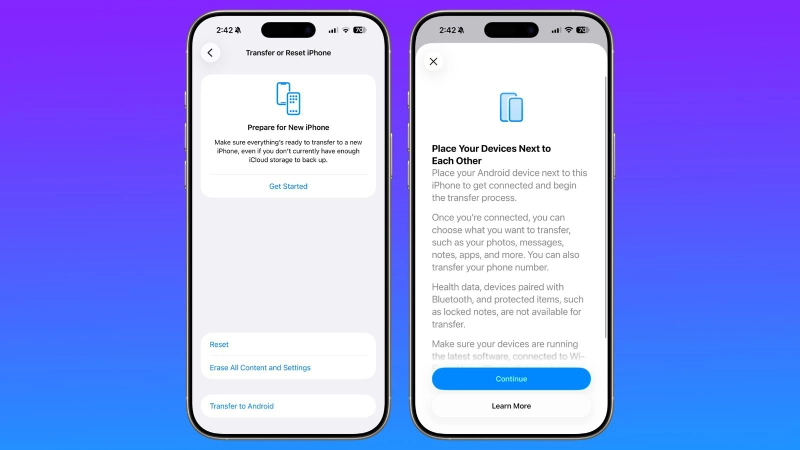
One of the more popular features in Beta 1, which has generated a lot of hype, is the introduction of a new technique for transferring all data from an iPhone to an Android phone.
The feature lets users place their iPhones near the Android device and start the data transfer without a separate app. The tool is capable of moving essential content, such as:
- Photos
- Messages
- Notes
- Passwords
- Phone number
- Other personal data
This option does not require a third-party application, which means the rotation across platforms is now smoother than before.
2. Third-Party Notification Forwarding
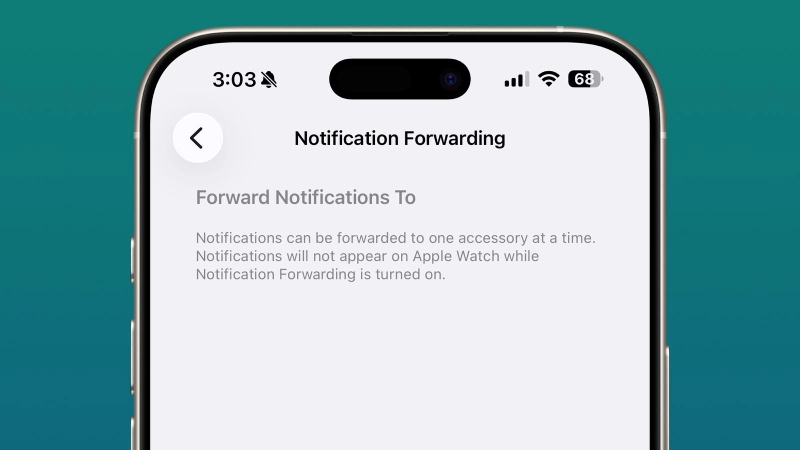
A new iPhone feature that allows Apple to send notifications to non-Apple accessories, such as smartwatches, is currently in testing.
Let’s explain it step by step:
- In the Settings app, a new “Notification Forwarding” feature is available.
- Users can choose to receive notifications on compatible accessories from their iPhone.
- Consequently, non-Apple wearables are likely to start receiving iPhone alerts directly.
An important note is that an Apple Watch may not display notifications at the same time if your third-party device is set to receive them.
3. Stability Improvements & Minor Fixes
Though Apple has not shared an exhaustive list of the changes for this beta, typically, the initial builds would comprise
refinements in performance, bug fixes, slight UI polishing, and enhanced app compatibility.
Such improvements in quality of life are pretty standard in point releases and also help make the upcoming public versions more stable.
List Of Compatible Devices
iOS 26.3 Beta 1 can be used on the same devices as iOS 26. iOS 26, in fact, provided wide device compatibility, mainly the iPhone series from the last few years.
Basically, the next iPhones get iOS 26:
- iPhone 11 series and newer
- iPhone 12, 13, 14 series
- iPhone 15 and 16 generations
- iPhone 17 models
- iPhone SE (2nd gen and later)
As this is a developer beta, Apple only allows installation via official developer channels.
How to Install iOS 26.3 Developer Beta 1
Before we start with the steps, let us recall that developer betas are not equivalent to public betas. To get them installed, a developer account is usually necessary.
Here is a simplified version of the process:
Step 1 — Become an Apple Developer
Sign up for Apple’s Developer Program (if you don’t have an account already).
Developer accounts usually incur a fee, and you will need to log in with your Apple ID.
Step 2 — Back Up Your Device
Connect your iPhone to a computer or use iCloud.
Make sure your data is fully backed up — betas might be great for testing, but they can also be unstable.
Step 3 — Enable Developer Beta Updates
- Open Settings → then tap on General → next, select Software Update.
- Click on Beta Updates.
- Select the iOS 26 developer beta from the list.
- Once you are registered, the iOS 26.3 beta will show up.
- Tap Download & Install to continue.
After the installation is complete, you can check the beta version on:
Settings → General → About.
Should You Install It?
The Pros & Cons
The decision to install iOS 26.3 Developer Beta 1 or not entirely hinges on your requirements.
Reasons to Try It
- You are a developer checking the app’s compatibility.
- You are a tech fanatic who loves early access.
- You want to test the new system settings.
Reasons to Wait
- Beta versions are notorious for their instability, leading to crashes and increased battery consumption.
- Third-party software may not work correctly or at all.
- Not the best choice for your primary phone.
If you are looking for a lower-risk preview, Apple typically releases a public beta soon after the developer beta. That is a safer alternative for ordinary users.
What This Means for iPhone Users
iOS 26.3 Beta 1 is not a blockbuster release with many features like major annual updates, yet its changes have significant consequences.
1. Easing Platform Switching
With the introduction of tools for transferring data to Android smartphones, Apple is acknowledging the need for cross-platform flexibility, a major user demand as the smartphone market becomes more competitive.
2. Enhanced Accessory Compatibility
The notification forwarding capability will be a big plus for those who own smartwatches and other non-Apple wearables. It indicates a move towards a more open iPhone ecosystem.
3. More Stable Future Releases
The behind-the-scenes modifications usually find their way into the leading public versions. So even if you have never installed this beta, its enhancements are making iOS 26.3 more reliable when the public release takes place.
Conclusion
The launch of iOS 26.3 Developer Beta 1 has been seen as a precursor to a new Apple update cycle. Even though the release does not include significant new features, it still offers some handy tools that will guide the user’s path in terms of freedom and accessory support.
Currently, developers and fans of the new technology can experience the changes firsthand. Still, ordinary customers are better off waiting for the public beta or a stable version, which is likely to be released in early 2026 after additional quality testing.
Betas will suffer no shortage of fixes and new features as Apple is likely to keep refining this release, and thus, we may see more. Keep your eyes open for updates, and remember that if you decide to apply a beta, always back up your device!

Comments are closed.