
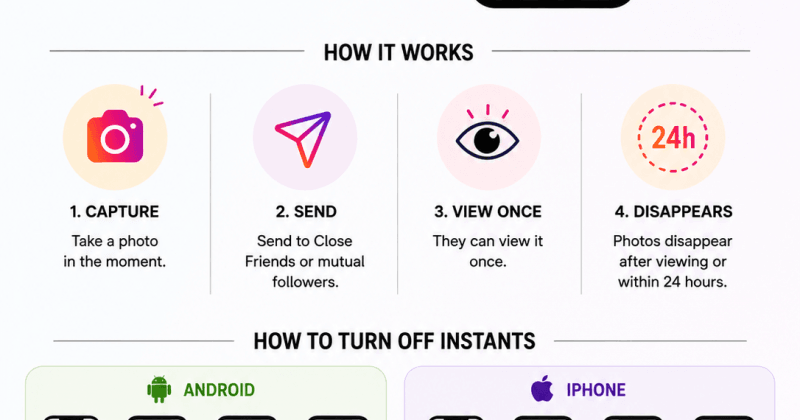

Instagram’s new “Instants” feature lets users send disappearing photos through DMs, similar to Snapchat and BeReal. The photos are meant to be spontaneous and unfiltered, can only be viewed once, and disappear after viewing or within 24 hours.
Instants appear inside the Instagram inbox and allow users to share quick photos with Close Friends or mutual followers. Unlike Stories, photos cannot be edited or uploaded from the gallery.
Many users have complained about accidentally sending photos because the feature instantly shares the image once the shutter button is tapped.
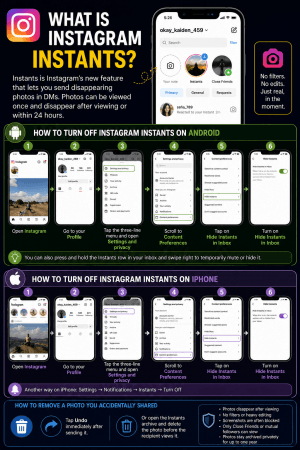
How to turn off Instagram Instants on Android
- Open Instagram
- Go to your Profile
- Tap the three-line menu in the top-right corner
- Open Settings and privacy
- Scroll to Content Preferences
- Turn on Hide Instants in Inbox
This removes the Instants section from your inbox and stops you from seeing incoming Instants.
You can also:
- Press and hold the Instants row in your inbox
- Swipe right to temporarily mute or hide it
How to turn off Instagram Instants on iPhone
The steps are the same for Apple iPhone users:
- Open Instagram
- Tap Profile
- Tap the three horizontal lines
- Go to Settings and privacy
- Select Content Preferences
- Enable Hide Instants in Inbox
Some users also report another method:
- Settings → Notifications → Instants → Turn Off
How to remove a photo accidentally shared through Instants
If you accidentally send an Instant:
- Tap Undo immediately after sending it
- Or open the Instants archive and delete the photo before the recipient views it
Key things to know about Instants
- Photos disappear after viewing
- No filters or heavy editing allowed
- Screenshots are blocked in many cases
- Only Close Friends or mutual followers can view them
- Photos stay archived privately for up to one year

Comments are closed.