

Grok Google Workspace debut follows SpaceXAI’s Microsoft 365 rollout the week prior, which brought Grok into Excel, Word, and PowerPoint. With this release, Grok now sits inside both major productivity suites, joining Microsoft’s own Copilot and Google’s built-in Gemini as a third AI option layered directly into office documents.
The launch follows SpaceXAI’s Microsoft 365 rollout the week prior, which brought Grok into Excel, Word, and PowerPoint. With this release, Grok now sits inside both major productivity suites, joining Microsoft’s own Copilot and Google’s built-in Gemini as a third AI option layered directly into office documents.
Grok Google Workspace: What the Add-On Actually Does
Grok appears as a sidebar inside each app rather than a separate browser tab, so switching context to consult the assistant isn’t necessary. In Sheets, it works as an analytical layer: users can ask questions about an active spreadsheet and get answers tied to specific cell references, alongside formula writing and scenario modeling.
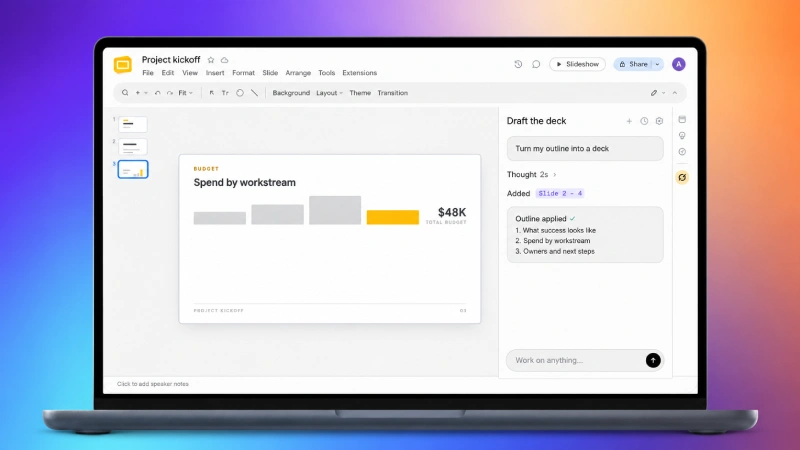
In Slides, Grok takes a rough outline and turns it into a working deck, researching supporting material from the web or from X and inserting diagrams or images to back up key points. It can also extend an existing presentation while keeping the visual theme consistent, and rewrite slide titles to state a conclusion rather than just label a topic.
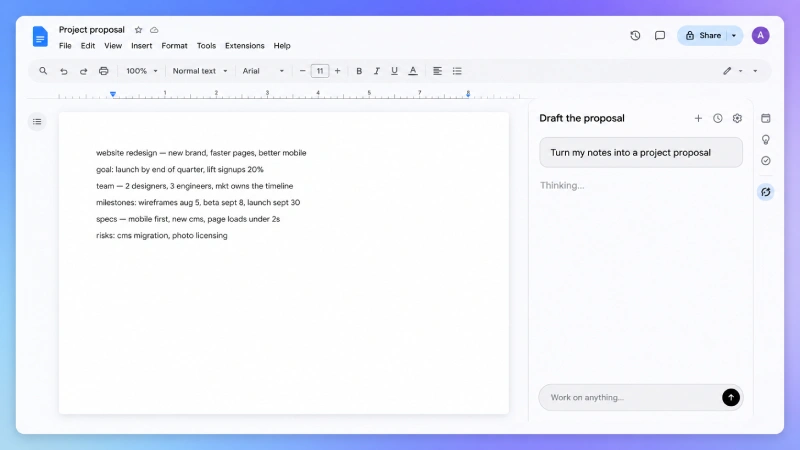
In Docs, the focus shifts to writing and editing: organizing unformatted notes into a structured draft with headings and lists, correcting grammar inline, and holding a consistent tone across a longer document. When connected to Gmail and Drive, Grok can pull additional context from recent emails or existing files to inform what it drafts.
How It Compares to Copilot and Gemini
Google’s Gemini already lives inside Workspace by default, and Microsoft’s Copilot performs similar tasks inside Word, Excel, and PowerPoint. Grok’s pitch is less about doing something entirely new and more about being available inside both ecosystems through one add-on, without requiring a Microsoft- or Google-specific subscription tier to unlock it. The Slides research feature, which can pull from X in addition to general web search, is one of the more distinct pieces, since neither Gemini nor Copilot currently pulls from X as a source.
The bigger open question is around governance. Because the add-on can connect to Gmail and Drive for added context, IT teams evaluating it for workplace use will need to weigh what data Grok can access against the productivity gain, the same tradeoff that comes up with any AI tool granted access to internal files and communications.
Who Should Care
Anyone doing regular drafting, spreadsheet analysis, or deck-building inside Google Workspace now has a free way to test Grok without leaving those apps. For teams already standardized on Gemini or Copilot, Grok functions as an additional option rather than a replacement, since it runs alongside existing tools instead of requiring a switch. The free pricing removes the barrier to trying it out, though heavier or enterprise-scale use may eventually come with its own tier, something SpaceXAI hasn’t detailed yet.
What to Watch Next
SpaceXAI hasn’t said whether a paid tier is coming for the Workspace add-on, or how usage limits might apply as adoption grows. With Grok now present in both major office suites, the next signal to watch is whether Google or Microsoft respond by tightening integration for their own in-house assistants, or whether enterprise IT policies start restricting third-party AI add-ons with document and email access.
Additionally, enterprise adoption will largely hinge on how robustly xAI addresses data privacy and security compliance. Organizations handling sensitive corporate data will demand firm assurances that proprietary documents aren’t used to retrain base models. Establishing clear administrative controls and security certifications will be vital for xAI to gain widespread business trust.

Comments are closed.