


Highlights
- AI note-taking apps in 2025 automate summaries, tagging, linking, and organization.
- Tools like Notion AI, OneNote Copilot, and Evernote AI turn notes into actionable workflows.
- Transcription, semantic search, and idea clustering make knowledge retrieval effortless.
- AI-powered platforms enable students, professionals, teams, and researchers to achieve more intelligent workflows.
In recent years, AI note-taking software has changed from a basic storage system to an AI-powered knowledge management tool. No matter if you are a student, researcher, professional, or creative thinker, the right note-taking app can simplify tedious tasks, summarize complicated content, organize ideas effectively, and help you work faster and smarter. As we approach 2025, AI-enhanced note-taking tools have advanced, offering features such as transcription, intelligent linking, contextual suggestions, and personalized insights. This guide looks at the best note-taking software with AI features, comparing their strengths and ideal use cases.
Why AI Matters in Note-Taking Today
Modern workflows need speed and clarity. Traditional note-taking often involves typing, sorting, tagging, and reorganizing. These tasks can slow users down. AI changes this landscape. Today’s note-taking tools can:
- Automatically summarize long documents, lectures, and meetings.
- Generate outlines, action items, and reminders from raw notes.
- Convert audio into searchable text.
- Establish connections between ideas through intelligent linking.
- Organize information into categories without manual tagging.
- Recommend related notes, topics, or resources.
- Allow natural-language searches across extensive archives.
AI makes note-taking easy and knowledge retrieval quick, turning your notes into a personal intelligence system.
Notion AI: The All-in-One Workspace for Students and Teams
Notion is well-known for its flexible workspace that combines notes, databases, project boards, and documents. The addition of Notion AI makes it one of the most effective productivity tools today.
Key AI Features
- Automatic summaries of long notes, articles, and meeting minutes.
- Smart writing assistance for drafting, rewriting, or expanding content.
- Task extraction, where AI identifies deadlines and to-dos directly from text.
- Database intelligence, generating structured tables from messy notes.
- Q&A over your workspace, allowing users to ask questions about stored information.
Why It Stands Out
AI concept is great for students, teams, or professionals who need a hybrid workspace that manages everything from research notes to planning and documentation. The AI’s ability to turn scattered ideas into polished output is particularly helpful for academic writing, project proposals, and collaboration.
Evernote with AI: A Classic Reborn for Modern Workflows
Once the most popular note-taking app, Evernote has updated itself by adding AI features to stay relevant. It remains one of the best apps for organizing large collections of notes, scans, and documents.
Key AI Features
- AI-generated summaries for long notes.
- Contextual search using natural-language queries.
- Innovative suggestions for related notes and tags.
- Automated formatting for cleaner, more readable notes.
- Transcription tools for audio notes.
Why It Stands Out
Evernote is unmatched for long-term storage, tagging, and document scanning. Its improved AI helps long-time users rediscover buried notes and enhance productivity with minimal effort.
Microsoft OneNote + Copilot: Perfect for Students and Office Users
Microsoft OneNote has gained power through integration with Microsoft Copilot. Embedded in the Office ecosystem, OneNote works well for students, researchers, and anyone using Microsoft products.
Key AI Features
- AI-generated summaries and study guides from handwritten or typed notes.
- Concept explanations, where Copilot clarifies topics in your notes.
- Meeting transcription when combined with Teams.
- Innovative organization, automatically grouping related notes and sections.
- Action-item extraction from multi-page notes or meeting logs.
Why It Stands Out
OneNote is the best free choice for handwriting and stylus-based note-taking. Copilot adds strong academic and professional features, making it a top option for Windows users and university students.
Obsidian + Community AI Plugins: The Knowledge Base for Power Users
Obsidian is a local-first, Markdown-based note-taking app recognized for its graph view, which displays connections between notes. With the rise of AI plugins, Obsidian has become one of the most customizable AI-powered note systems available.
Key AI Features
- Local or cloud-based AI assistants through community plugins.
- Automatic linking between related notes.
- Semantic search across your entire vault.
- AI-driven content generation for summaries, explanations, and rewrites.
- Idea clustering, showing relationships between themes and topics.

Why It Stands Out
Obsidian is perfect for researchers, writers, knowledge workers, and anyone who prefers local control over cloud-based systems. It excels in building personal knowledge bases, second brains, and long-term writing projects.
Google Keep + Gemini: Lightweight, Fast, and Smart
For those who prefer a clean and straightforward note-taking experience enhanced by AI, Google Keep remains one of the best minimalist choices. With Gemini support across Google services, Keep gains more innovative features without sacrificing its lightweight design.
Key AI Features
- Voice-to-text transcription.
- Smart reminders and contextual suggestions.
- AI-generated lists and checklists.
- Cross-app integration with Google Docs and Gmail.
- Image text recognition (OCR).
Why It Stands Out
Keep is ideal for quick notes, lists, reminders, and mobile note-taking. Its simplicity appeals to users who want AI features without a complicated interface.
Roam Research: The AI-Powered Tool for Networked Thinking
Roam Research introduced the “networked thought” approach to digital note-taking. With AI integration, Roam enhances its ability to create complex knowledge webs.
Key AI Features
- AI-generated bidirectional links.
- Smart tagging and clustering of concepts.
- Automated daily notes and idea generation.
- Semantic search across linked topics.
- Content expansion for research and writing.
Why It Stands Out
Roam is suitable for academics, philosophers, writers, and thinkers who organize ideas through connections rather than folders. Its AI uncovers relationships between concepts that you might overlook on your own.
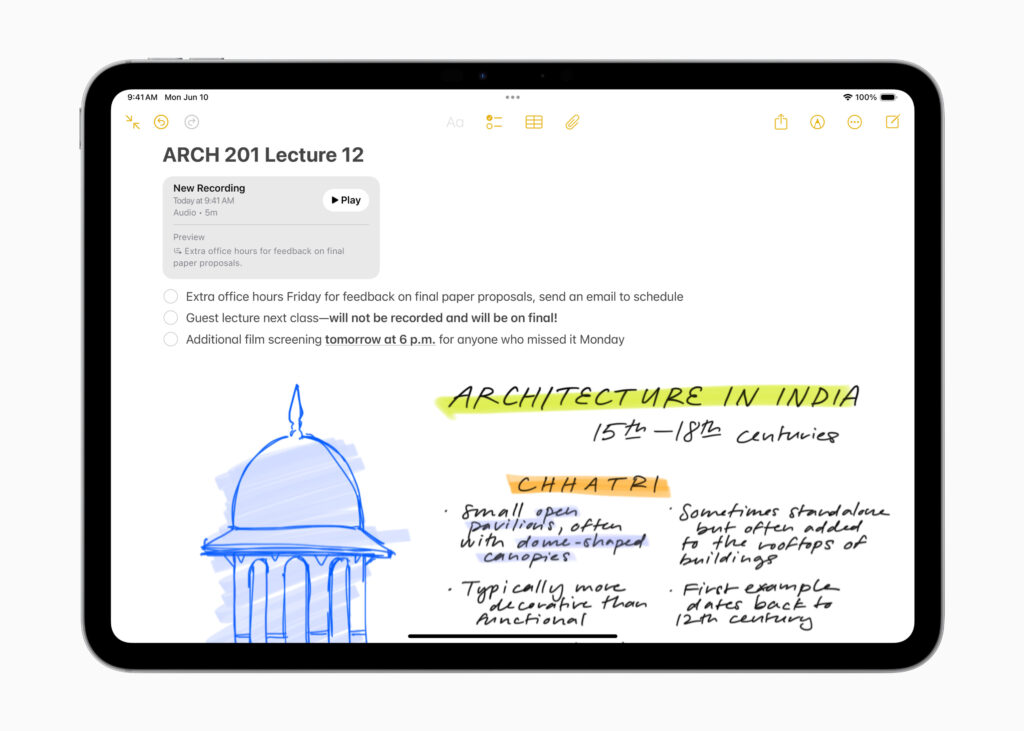
Apple Notes + Apple Intelligence: Simple Yet Surprisingly Powerful
Apple Notes is one of the most user-friendly note-taking apps for iPhone, iPad, and Mac users. With the introduction of Apple Intelligence, the app has become more capable.
Key AI Features
- Smart proofreading and rewrite suggestions.
- Searchable transcriptions for audio notes.
- Automatic categorization of notes.
- Summaries and smart formatting.
- Image understanding, enabling search within screenshots.
Why It Stands Out
Apple Notes is outstanding for users who want an easy, Apple-integrated experience with powerful AI features that feel natural and private.
Choosing the Best AI Note-Taking App for Your Needs
Here’s a quick overview based on use:
- Students → OneNote + Copilot, Notion AI.
- Writers and researchers → Obsidian AI, Roam Research.
- Professionals → Notion AI, Evernote AI.
- Mobile-first users → Google Keep + Gemini, Apple Notes.
- Teams → Notion AI, Microsoft OneNote.
Your ideal app depends on whether you value collaboration, deep knowledge management, simplicity, or AI-driven writing tools.
Final Thoughts
AI-powered note-taking software is changing how we think, learn, and work. Instead of just storing information, modern tools help users understand, summarize, and connect ideas.

Whether you prefer the all-in-one capabilities of Notion AI, the research-oriented depth of Obsidian, or the ease of Google Keep, today’s AI-enhanced note-taking apps offer powerful ways to increase productivity and spark creativity. As AI continues to improve, note-taking will become even more innovative, more intuitive, and more personalized.

Comments are closed.