


Highlights
- A bloatware-free smartphone offers a cleaner, faster, and less distracting experience by minimising pre-installed apps, system ads, and duplicate software.
- iPhones and near-stock Android phones like Google Pixel come closest to being bloatware-free, while unlocked devices are generally cleaner than carrier-locked models.
- Even on bloated phones, most unwanted apps, ads, and system clutter can be reduced through uninstalling, disabling system apps, and adjusting settings.
If you have ever unboxed a new phone and spent the first hour uninstalling random apps you never asked for, you already know what bloatware is and how annoying it can be.
Unsplash
A truly clean, bloatware-free smartphone feels different. It is lighter, faster, less distracting, and more “yours” from day one. This guide walks you through what bloatware actually is, which brands tend to be cleaner, and how you can get as close as possible to a “pure” experience, even if you cannot buy an official “stock Android” device.
What exactly is bloatware?
“Bloatware” is any pre-installed software you did not ask for and probably do not need. It can come from:
- The phone maker (their own browser, app store, themes, “cleaners”).
- The carrier (self-care apps, account tools, promotions).
- Third parties (shopping apps, social networks, games added through commercial deals).
Some of it is harmless and removable. Some can be uninstalled only with tricks. Some cannot be removed at all and just sit there, eating space and occasionally nudging you with notifications.
Bloatware matters because it:
- Consumes storage and sometimes RAM in the background.
- Clutters your app drawer and settings.
- Can push ads, notifications, and “recommendations.”
- Makes updates more complicated and sometimes slower.
So when you say you want a “bloatware-free smartphone,” what you really want is:
- Minimal pre-installed apps.
- No spammy notifications from system apps.
- No duplicate apps (three browsers, two app stores, two music players).
- Control over what runs on your device.
Which phones are closest to being bloatware-free?
Absolute zero bloatware is rare, but some ecosystems come very close.
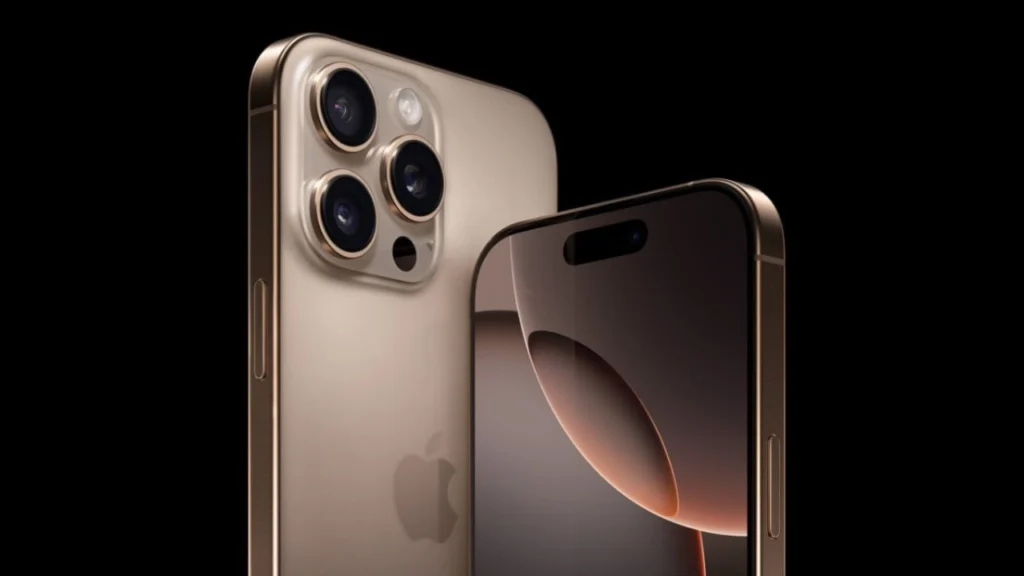
iPhones (iOS)
Apple does not allow carriers or third-party companies to preload random apps on iPhones. You do get Apple’s own suite (Safari, Mail, Music, etc.), but:
- There are no brand or carrier “bonus” apps.
- Many Apple apps can now be deleted or hidden.
- There is no system-level advertising or “recommendation” feed in the UI.
If you are okay living fully in Apple’s ecosystem, an iPhone is one of the cleanest mainstream experiences you can buy.
Google Pixel (and other “near-stock” Android)
Google’s Pixel line is the reference for “pure” Android:
- Minimal Google apps plus a few Pixel-exclusive features.
- No duplicate apps (only one messages app, one photos app, etc.).
- No carrier bloat on unlocked models; even carrier versions tend to be relatively clean compared with many other brands.
Other brands that often stay close to stock on at least some models include certain Motorola and Nokia Android One / near-stock devices, where the interface is very close to what Google ships on Pixels, with only a handful of extras.
Clean-leaning Android skins
Some manufacturers ship custom UIs but keep them fairly tidy:
- Nothing OS (Nothing phones) has a visual identity and a few custom apps, but is generally light, with relatively little third-party stuff.
- OnePlus / OxygenOS (on global models) is not bloat-free, but historically lighter and snappier than many heavy skins, with fewer pre-installed junk apps.
- Select Asus and Sony phones often avoid the worst kinds of junk, sticking close to a stock-like experience.
On the other hand, several budget and mid-range phones from big brands ship with many partner apps, game hubs, “cleaners,” and built-in ad recommendations. These are not unusable, but they are not what you would call bloatware-free.

How to evaluate “bloat” before you buy
You do not have to guess. Here is how to judge bloatware before spending your money:
Watch real-world reviews: Look specifically for reviewers who show the app drawer and walk through settings on first boot. If you see three pages of unfamiliar icons, that is your warning. Search “(phone model) bloatware”: Enthusiast forums and Reddit threads are brutally honest about how much junk a phone ships with and how hard it is to remove.
Check regional differences: The same phone can be relatively clean in one country and full of partner apps in another because of carrier or local deals. Look for reviews from your region.
Avoid carrier-locked phones if possible: Carrier-branded phones are much more likely to include extras you cannot uninstall. Unlocked / direct-from-manufacturer units are typically cleaner.
Reducing bloatware on a phone you already own
Maybe you cannot buy a new “clean” phone right now. You can still significantly improve your current one.
Uninstall everything you can
Start with:
- Preloaded shopping, food delivery, and game apps.
- “Boosters,” “cleaners,” or “RAM savers” (Android manages memory on its own).
- Duplicate apps (if you prefer Chrome, remove other browsers; if you like Spotify, uninstall other music apps).
On Android, long-press
Disable system apps you cannot uninstall (Android)
In Settings
- Tap the offending system app (for example, a manufacturer’s app store).
- Hit “Disable” and revoke permissions/notifications if possible.
The app will disappear from your launcher and no longer run in the background.
Be careful with anything that looks core to the system (phone, messages, settings, Google Play services). If you are not sure, search the app name online before disabling.

Turn off ads and recommendations
Some Android skins show “recommendations” in:
- File managers
- Themes apps
- Lock screens
- App drawers
These are basically built-in ads. Usually, you can:
- Open that app
- Turn off “Show recommendations,” “Online content,” or similar toggles.
This one change can make a cluttered phone feel much less spammy.
Use alternative launchers and keyboards
If the home screen itself feels bloated with brand services and widgets, try an alternative launcher (on Android):
- A clean launcher lets you hide rarely used apps, customise your app drawer, and create a minimal, distraction-free home screen.
Similarly, a third-party keyboard app can offer a cleaner, less noisy typing experience than the manufacturer’s own keyboard that may have ads or weird extras.
Going deeper: advanced (but risky) options
If you are a power user, there are more powerful tools, but with more risk.
ADB debloating (Android)
Using Android’s debug tools on a PC, you can uninstall or disable system apps for your user. This can remove things the normal settings menu will not touch. It does not usually require rooting, but:
- It is easier to break something if you remove the wrong package.
- System updates can reinstall some apps.
Custom ROMs
On certain Android phones with an active developer community, you can install custom ROMs such as LineageOS or Pixel Experience that aim to be clean and close to stock.
- Pros: very little bloat, frequent updates on popular devices, and more control.
- Cons: voided warranties, risk of bricking, and sometimes loss of certain camera or network features.
If you are not comfortable following technical guides carefully, it is better to stick to official tools and regularly uninstall/disable them.
Bloatware vs value: be realistic
It is tempting to make “no bloatware” your only criterion. In reality, you are balancing:
- Budget: Many budget phones ship extra apps to keep prices low via partnerships. A cleaner phone may cost more.
- Brand features: Some manufacturer apps are genuinely useful with advanced camera tools, backup utilities, and note apps. Not all extras are junk.
- Updates and support: A clean but obscure brand with poor updates may be worse long-term than a slightly bloated phone from a major manufacturer with three to five years of security patches.
The goal is not ideological purity. It is comfort: a phone that feels responsive, uncluttered, and under your control.
A simple decision checklist
When you are next choosing a phone and want it as bloat-free as possible, ask:
- Is it iOS or near-stock Android?
If yes, you are already in a better place. - Is it unlocked and direct-from-brand or carrier-locked?
Prefer unlocked if you can. - Have you watched unboxing/software walkthroughs to see the app drawer on day one?
If you see too many logos you do not recognise, think twice. - How easy is it to uninstall or disable what you do not want?
A slightly bloated phone that lets you remove almost everything is still okay. - Will the phone receive regular updates?
Security matters as much as cleanliness.
Conclusion
A bloatware-free (or at least bloatware-light) smartphone is not just about storage space. It is about respect: the feeling that your new device is not a billboard, but a tool that works for you.

You may not be able to get a perfect blank canvas, but with smart choices before you buy, and a bit of cleaning after, you can get very close. In the end, the best smartphone is the one that stays out of your way, lets you choose what runs on it, and quietly does its job without shouting for your attention.

Comments are closed.