
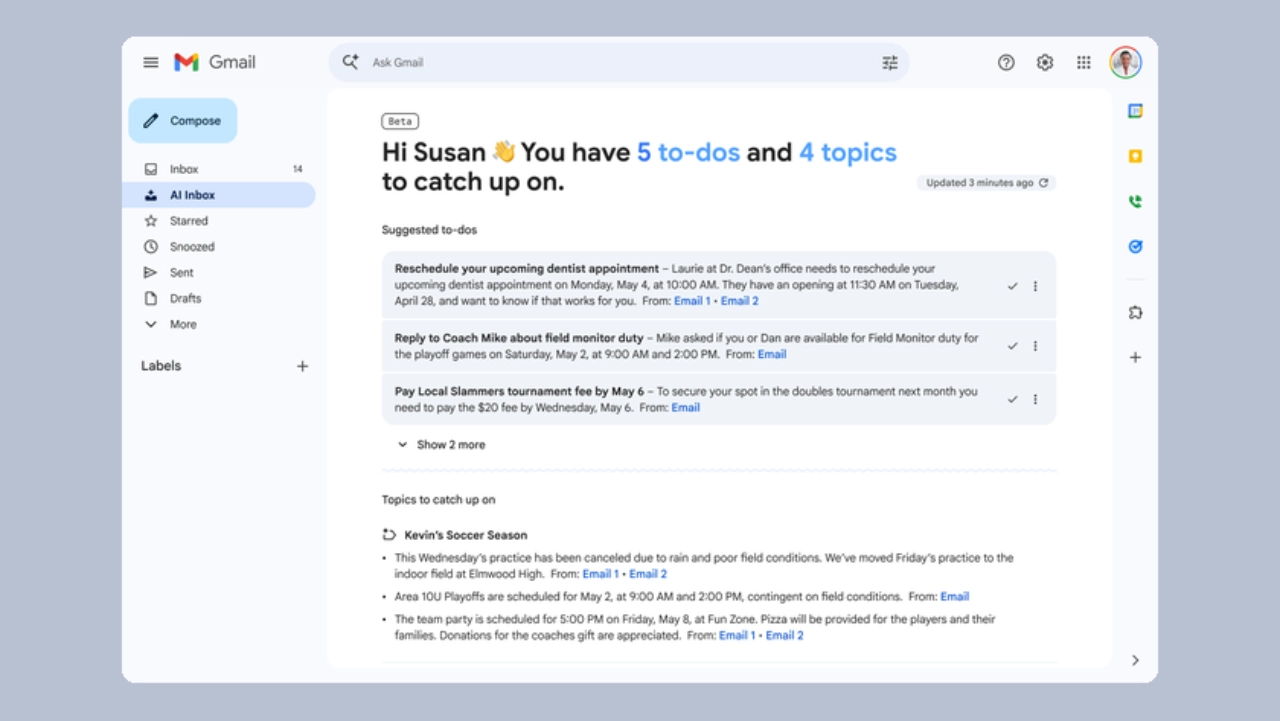

The Gemini – based upgrade from Google Gemini created a new email system that functions as an intelligent workspace that organizes tasks by their importance. Google is rolling out a major upgrade to Gmail with the introduction of an AI-powered inbox, designed to automatically organize emails, surface priorities, and reduce clutter. The feature, which Google announced through official updates and news reports, demonstrates the company’s plan to use Gemini AI for its ecosystem transformation, which will make Gmail a more advanced task management system.
A Smarter Inbox Built Around Priorities
The new system introduces AI Inbit as its main innovation, which replaces conventional email display methods by providing users with their most relevant content. Google states that the s “stem “clears away unnecessary content, which enables users to concentrate on their most critical tasks.
The AI system detects essential messages by examining incoming emails to determine which conversations require immediate attention and which messages need to be followed up on. The system recognizes priority contacts through their contact frequency and their established relationship with the user, and automatically displays their message to the user. Gmail now functions as an active decision-making tool that supports users in their information management tasks.
Google Gemini: Turning Emails Into To-Do Lists
The AI Inbox system enables users to transform their received email messages into tasks that they can execute from their inbox. The system uses automated functions to identify crucial items, which include bills, meeting requests, and pending replies, and organizes them into “Suggested” to-do sections.
Gmail shows a new section called “Topics to catch up on,” which the AI uses to summarise ongoing conversations and themes across emails through this feature. The dual structure of the system provides users with two methods to quickly comprehend which tasks need their immediate attention and which materials they must examine. The task management system, which Google created through inbox reformation, functions as a solution to Gmail’s main challenges, which create information overload for users.
AI Summaries And Contextual Understanding
The AI Inbox system which operates through Gmail connects with all Gemini powered functions in the application, especially through its AI Overviews feature which provides users with quick key points from extensive email discussions. The summaries present essential information together with their corresponding replies, which enables users to understand the discussion without studying all chat messages.
Users can search their inbox through natural language queries, which enables them to use Gmail as a knowledge base that users can search instead of functioning as a permanent storage space. Google employs this contextual comprehension feature as the main component of its AI productivity capabilities, which drive its entire operational framework.
Powered by Gemini AI
The new capabilities are Gmail’s transition into what Google calls” the Gemin era,” where generative AI is embedded across core workflows. The AI Inbox operated through sophisticated systems that enable it to analyze user intentions and relationship patterns, together with email message priority levels.
Gemini provides users with advanced capabilities that support their needs beyond simple email organization. These are as follows:
- Smart email drafting” with “Help Me “Write” suggested replies tailored to the user’s tone.
- Automated proofreading and corrections
Together, these features aim to reduce both the cognitive load of reading emails and the effort required to respond.
Early Rollout And Availability
The AI Inbox system currently rolls out its features in multiple stages, which enable users to access its functionalities through early testing that includes premium users who participate in Google AI plans. The system will begin to expand its user base through multiple stages, which will begin with English – speaking customers located in the United States. Google implements a staged rollout to advance the level of performance and gather feedback before global expansion.
Benefits And Real World Impact
AI Inbox solves the long-standing problem of email overload, which has existed since the beginning of email. Professionals now receive dozens to hundreds of emails daily, which makes them unable to sort their emails manually.
Gmail uses automated systems to prioritize emails and create summaries because it wants to achieve these three goals. The system helps users control their email volume because it decreases their email handling time. The system helps users respond more quickly to emails because it provides better email management. The system helps users create task lists because it prevents them from missing important tasks and deadlines.
The incoming emails system operates as a workflow system because it automatically sorts incoming messages into different categories while creating appropriate contextual information for each message.

Concerns Around Control And Visibility
This feature provides benefits to users, but it creates two major problems that need resolution. AI filters create a visibility problem because they automatically block access to emails that the system considers unimportant. Users may have difficulty reaching marketers and newsletters, and cold outreach, as they may find it difficult to reach potential users if everything is posed as clutter. Usability considerations have also been an issue. Even though AI is surfacing potential tasks, the user has to make sure of the suggestions in order to ensure nothing important is overlooked, specifically during the inception stages.
Privacy, too, remains another key aspect. Google has elaborated that Gmail information is not used to train its AI models, and users can also switch off the smart features if they want to.
Conclusion:
The AI Inbox from Google represents the most important transformation to Gmail since its last major update. The feature enables users to organize their emails by combining three functions: prioritization, summarization, and task generation.
The AI Inbox rollout will succeed or fail based on its capacity to maintain control between automated processes and user decision-making. The system has the potential to transform email handling for billions of users because it will automate inbox management tasks through intelligent systems.

Comments are closed.