
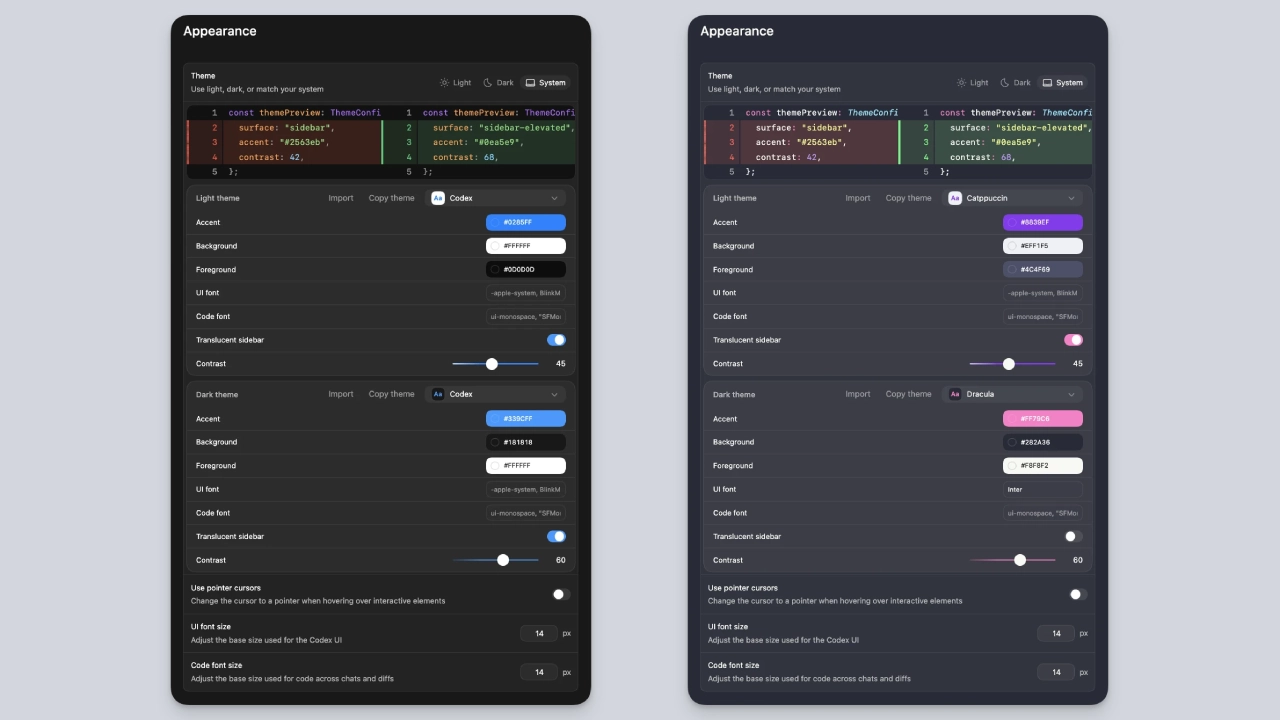

The OpenAI Codex App has recently been updated with several new features related to personalization and improved configuration controls for developers, as highlighted in a recent announcement from the Official OpenAI Developers Account on X (formerly Twitter).
The new features are part of OpenAI’s overall strategy to improve the developer experience with Codex (its AI-Powered Programming Assistant) by enabling developers to work with the best tools and resources available to them to improve their coding workflows more efficiently.
OpenAI Codex: New Personalization Options
With the new personalization features, users can create a custom theme for the Codex app user interface and adjust its visual appearance and functionality.
The personalization functionality has been designed to make developers feel more comfortable during long coding sessions and align with how many developers like to use customization features in their coding environments.
With these personalization features, Codex becomes more similar to other modern developer tools that provide extensive customization options.
Expanded Settings and Configuration Controls
OpenAI has also expanded the settings panel in the Codex app to further help users control how the application operates. As stated in OpenAI’s developer guide, the settings panel can be opened from either the app menu or via keyboard shortcut(s) and allows developers to customize various operational parameters.
Examples include file-handling behavior, integration with development tools, and application-preference configuration.
The customization potential of the settings panel is intended to support developers as they adjust their Codex environment to better fit their individual workflows.
Designed for Multiple Projects at Once
The Codex desktop application has been developed to support multiple concurrent coding projects by allowing developers to launch tasks in parallel threads while managing multiple repositories on a single interface.
Through these abilities, Codex can help with a range of development activities, including debugging, code creation, and document generation across multiple code bases simultaneously. The latest changes add greater flexibility for developers to manage projects and customize how they are accessed.
An Expansion of the OpenAI Developer Ecosystem
These latest improvements reflect the ongoing development of an extensive OpenAI developer ecosystem. As Codex becomes increasingly used as a cognitive productivity assistant for all programmers, it can automate repetitive tasks in a structured manner for both debugging and document creation.
OpenAI is making Codex feel more like a comprehensive IDE than just an AI-based assistant by adding personalization options and more granular settings.
Enhancing the AI Coding Experience
AI coding assistants are increasingly prevalent in current software development methods. Solutions like Codex enable developers to generate code fragments, provide detailed descriptions of complex algorithms, and shorten their production timelines.
These new customization features may appear minor; however, they demonstrate a movement towards creating AI tools that are more accommodating to individual developer needs. OpenAI is striving to increase the usability and actual adoption of Codex as a development tool for professional developers by allowing users to customize how they view and interact with the system, thereby enabling them to achieve their desired results.

Conclusion
As AI-based programming continues to advance, we anticipate applications such as Codex will introduce progressively more advanced capabilities (e.g., integration into IDEs, automated testing tools, and project management software).
Codex is undergoing continuous updates to both the AI’s functionality and the developer experience. As customization and configuration options continue to expand, Codex will provide greater flexibility and capabilities, enabling programmers to work on multiple project-based deliveries.

Comments are closed.