
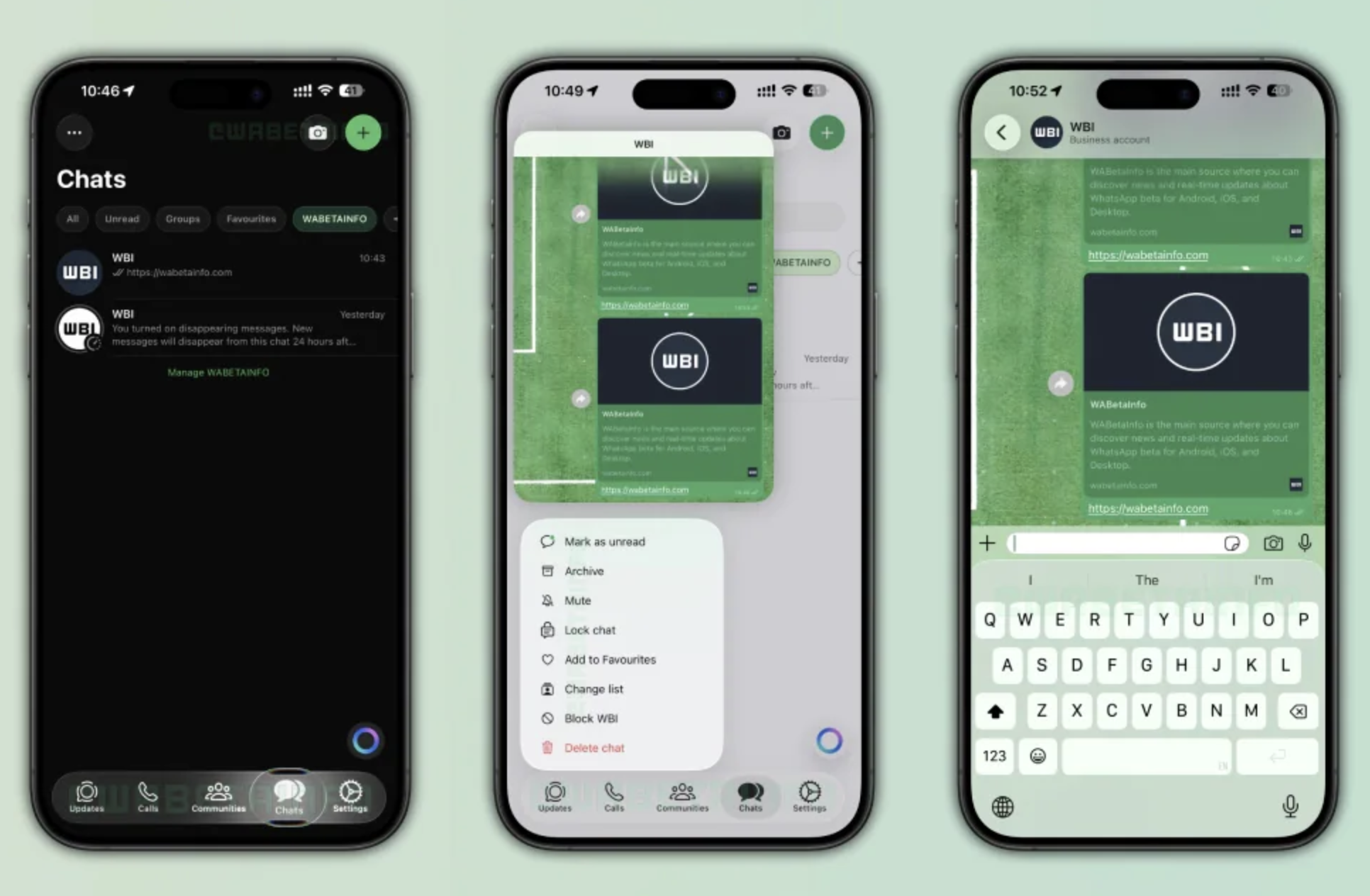

WhatsApp’s “Liquid Glass” is a new visual redesign inspired by Apple’s iOS 26 design language. It introduces a glass-like, translucent interface with layered depth and smoother animations.
Instead of flat colors and rigid UI blocks, the app now uses soft transparency and blur effectsgiving it a more modern, fluid look.
Key Design Changes in the New UI
1. Glass-Like Transparency
The biggest change is the semi-transparent UI elements:
- Background content subtly shows through menus
- Chat screens and popups use blur effects
- Interface feels lighter and more immersive
2. Floating Navigation Bar
The bottom tab bar now looks like it’s floating above the screen instead of being fixed.
- Adds a sense of depth
- Adapts visually to the content behind it
3. Redesigned Buttons & Menus
Buttons and context menus now have a frosted glass style with smoother animations.
- Press interactions feel more fluid
- UI elements blend better with the overall design
4. New Keyboard & Chat Experience
Even the keyboard and chat input bar are updated:
- More translucent design
- Softer edges and integrated look
- Better alignment with system UI
Where You’ll Notice It Most
The biggest changes appear in:
- Chat screens (top bar + message input area)
- Navigation tabs
- Pop-up menus and actions
WhatsApp is also working to expand this design across more sections like voice notes and chat tools.
Availability: Who Gets It?
- Currently rolling out mainly on iPhones (iOS 26)
- Available in newer WhatsApp versions (like 26.14.76)
- Rolling out gradually—not everyone has it yet
For Android users:
- The design is not widely available yet
- May come later in adapted form
Why WhatsApp Is Doing This
This update is part of a bigger shift:
- Align with modern OS design trends
- Improve visual experience and usability
- Make WhatsApp feel more premium and fluid
It also reflects how apps are evolving toward more dynamic, layered interfaces.
The Bottom Line
WhatsApp’s Liquid Glass UI is not a new feature—it’s a design overhaul.
It focuses on:
- Better visuals
- Smoother interactions
- A more modern feel
The functionality remains the same, but the experience becomes more refined and immersive.
Comments are closed.