
OpenAI is making it easier for users to work with Google Workspace files directly inside ChatGPT. The company has introduced the ChatGPT Google Drive feature by expanding its Google Drive integrationallowing users to bring Google Docs, Sheets, and Slides into their ChatGPT workflow and work with them alongside an ongoing conversation.
The change reduces the need to move repeatedly between ChatGPT and Google Drive when reviewing or working on existing files. Instead, users with the required Google Drive connection can access their files from within ChatGPT and use them as context for tasks such as analysis, comparison and content creation.
Google Docs, Sheets and Slides Come to ChatGPT
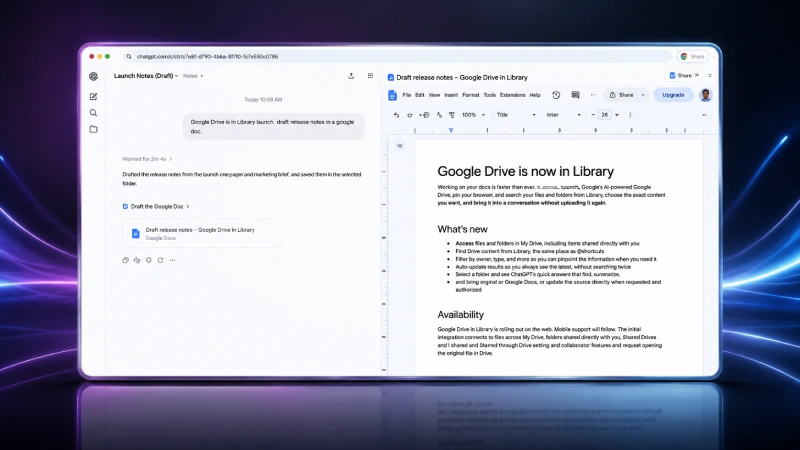
The main change is the ability to open supported Google Drive files directly beside the ChatGPT conversation. Users can work with Google Docs, Sheets and Slides while continuing to interact with ChatGPT, creating a more integrated workspace for file-based tasks. Once a file is available to ChatGPT, users can ask the AI to summarize its contents, analyse information, compare material or create something new based on the file.
This can be useful for reviewing documents, examining spreadsheet data or developing content from information already stored in Google Drive. The integration also goes beyond simply reading files. Where supported and properly authorized, users can make changes to the original Drive file through ChatGPT rather than having to download the content, edit it separately and upload it again.
ChatGPT Google Drive Feature: Drive Files Are Easier to Access
The updated experience also makes connected Drive content easier to find inside ChatGPT. Users can browse their available files and folders through Library, while individual files can also be brought into a conversation through the composer or by using an @mention. This means users do not necessarily have to upload the same document whenever they want ChatGPT to work with it.
Once the appropriate connection and permissions are established, files stored in Drive can become part of the user’s existing ChatGPT workflow. ChatGPT can also work across files within a selected Google Drive folder. This is useful when information related to one task is spread across multiple documents, spreadsheets, or presentations, as users can provide a broader collection of files rather than handling each one individually.
What Changes for Users?
The biggest practical change is the reduction in tab switching and manual file handling. Previously, a user working between ChatGPT and Google Drive could need to move between services to read a file, ask ChatGPT about it, and then return to Drive to make changes. The expanded integration brings more of that process into one workspace.
A user could, for example, bring a collection of project documents into ChatGPT, ask for a summary or comparison, use the resulting information to create new content and, where supported, update the original Drive file. The feature therefore focuses less on introducing another AI tool and more on connecting ChatGPT with files users already keep in Google’s productivity ecosystem.
Google Drive Integration Comes With Permission Controls
The integration requires users to connect their Google account and provide the permissions necessary for the actions they want ChatGPT to perform. Read-related and write-related capabilities can require different permissions, meaning access to a file does not automatically mean every possible action can be performed on it.
For work and educational environments, administrators can also have additional controls over Google Drive actions and how connected services are used within their organization. Some Google Drive functions also continue to require users to open the original file in Google Drive. This means the integration does not completely replace Google’s own editing and collaboration environment.
Rollout Starts on the Web
OpenAI is rolling out the updated Google Drive experience on the web to Plus, Pro, Business, Enterprise, Edu, and Healthcare users across ChatGPT and ChatGPT Work. Mobile support is planned to follow. The initial availability covers My Drive and files or folders shared directly with users, while Shared Drives are not included in the first rollout. The expansion also builds on OpenAI’s broader move to bring Google Docs, Sheets and Slides functionality together through the Google Drive connection, giving users a more unified way to access their Google files from ChatGPT.
Conclusion
The expanded Google Drive integration brings Google Docs, Sheets and Slides closer to the centre of the ChatGPT workflow, allowing users to work with existing files without constantly moving between applications. With Library access, folder-based workflows and supported file updates, the change could make ChatGPT more useful for users who regularly combine AI assistance with Google Workspace files. The feature is currently rolling out on the web, with mobile availability and further Drive capabilities expected to expand the experience.