
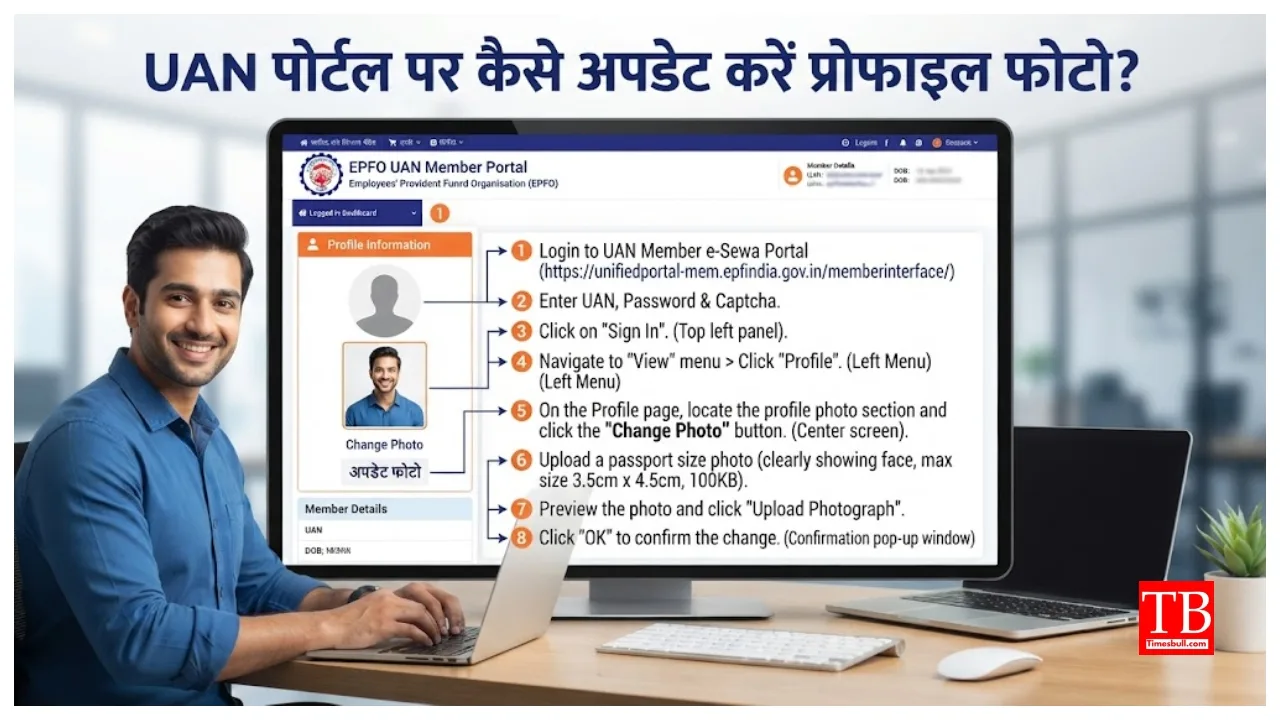
EPFO News – Update profile photo on UAN portal, otherwise PF claim may get stuck, know step-by-step guide.

EPFO News:- It has become very important for EPFO members to update the profile photo on the UAN portal. The photo is part of the member’s digital identity and is used during online verification. Although photo is not mandatory for all EPFO transactions, it is necessary to complete e-nomination and without it you will not be able to complete the e-nomination process. If the profile photo is not there or is old, then the PF claim may also be delayed. Therefore, login to the EPFO portal and immediately upload your latest passport size photo.
EPFO profile photo: A little information, big work
Employed people are definitely members of EPFO. In such a situation, you should keep your UAN profile thoroughly updated on the portal. If you do not do this, you may suffer a big loss. Many people do not consider it necessary to update the photo in this profile, but it is very important to complete your profile. EPFO has requested its members to upload their recent profile photo to complete the e-nomination and online claim process.
Why is it important to update profile photo?
Profile photo is an important part of the member’s digital identity and is used during online verification.
Although uploading profile photo is not mandatory for all EPFO transactions, those who have not uploaded or updated their photo may find it difficult to complete e-nomination. Actually, during the process of e-nomination, if there is no profile photo, then the system shows an error message like “unable to proceed”.
According to EPFO, profile photo is required for some services like e-nomination. Apart from this, if the photo is updated, then the possibility of delay in settlement of PF related claims is also less. A valid nomination ensures that your EPF balance, pension and insurance benefits easily reach the right beneficiary. If you do not choose a nominee, your family may face delays and additional paperwork in claiming the money.
How to update photo on UAN profile portal
If you have not updated your profile photo yet, then you can easily update it by using these few steps:
Login: Visit EPFO’s Unified Member Portal (epfindia.gov.in) and log in with your UAN, password and captcha.
Go to the Profile section: Go to the ‘Profile’ or ‘View’ section on the dashboard.
Choose an upload option: Select ‘Change Photo’ or ‘Update Profile Photo’.
Upload Photo: Browse, select a recent passport size photo from your computer or mobile and upload it. The photo should be 3.5 cm x 4.5 cm in size, less than 100 KB and in jpeg/jpg/png format.
Save and Verify: After uploading the photo, click ‘Save’ or ‘OK’. Once updated, check that the photo looks correct.
Not only photos, keep this information also updated
Not only the profile photo, but you also have many other information along with it which should be updated. Aadhaar card number, PAN, bank account, mobile number and email ID should also be correct and verified. EPFO has simplified the process of profile updation, where members with Aadhaar-verified UAN can update many details themselves. With this, online PF withdrawal, pension services, e-nomination and claim settlement can be done easily.
conclusion
Updating profile photo on EPFO’s UAN portal is no longer just an advice but a necessity, especially if you want to do e-nomination or avoid delays in PF claims. An updated profile not only ensures your identity but also makes the claim process easier for your family members in future.
If you have not yet updated your profile photo, update it today by following the steps mentioned above. Also, check other information like bank details, Aadhaar and mobile number. This small step can save you from big trouble in future.
Stay tuned to timesbull.com for such important information related to EPFO and PF.

Comments are closed.