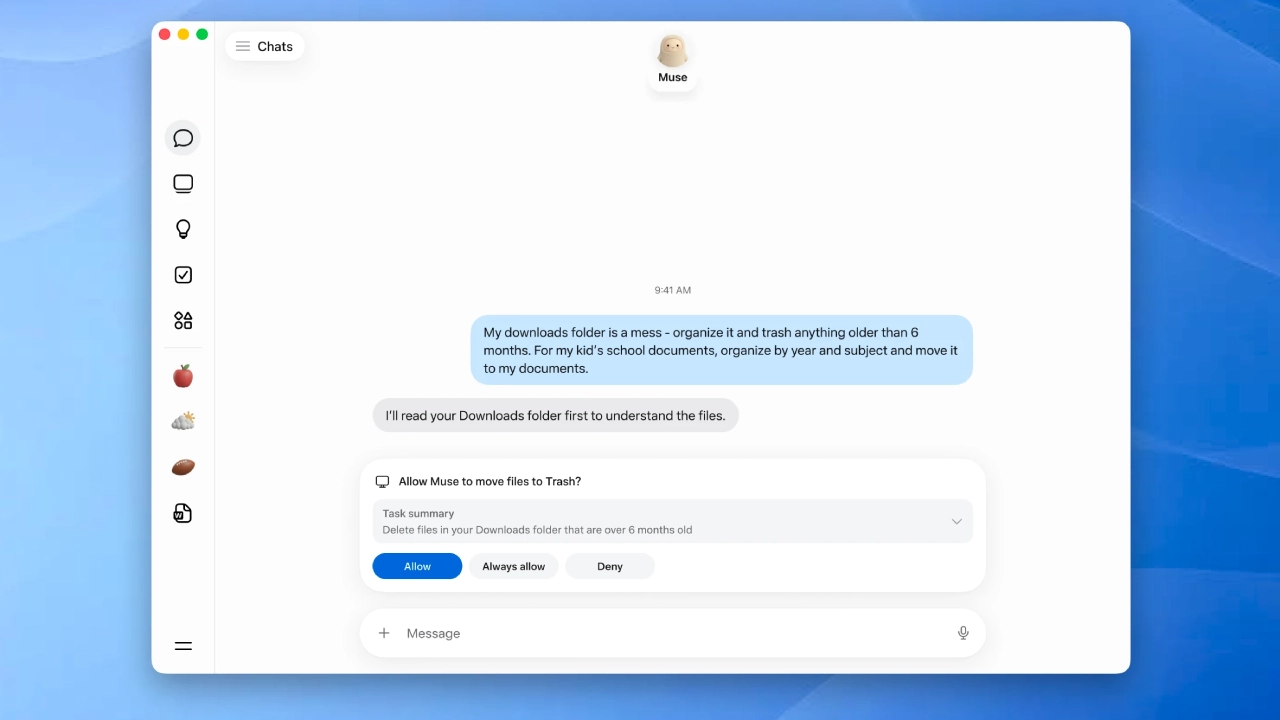
Meta has released a native Mac application for Meta Muse, allowing its personal AI agent to work with information and applications on a user’s computer. The release represents a significant expansion in Muse beyond its earlier web, mobile, and messaging-based capabilities, bringing agentic AI closer to the desktop where users keep much of their personal information.
The distinction is important: Muse itself is not a new product this week. Meta launched Muse on September 8 as a personal AI agent built to accomplish tasks for a user. The new launch is the native Mac version — which Meta describes as the first version of Muse that can complete things on a user’s computer. ((Meta AI)(2))
Meta Muse Can Work Across Mac Apps and Files
Unlike a conventional chatbot, Muse for Mac is intended to work with information already stored on the computer. Meta points to practical examples such as organizing folders, preparing an end-of-day summary using information from emails, chats, and notes, or finishing a partially filled form with information on the Mac.
That capability changes the nature of the assistant; instead of the user having to collect and paste information into a chatbot, Muse can potentially collate different pieces of context across the computer.
For example, a single task could involve viewing a calendar appointment, finding related correspondence in Mail, locating a document in a folder, and referencing a conversation in Messages. The appeal is therefore less about creating another AI response and more about letting an agent coordinate information across applications.
Meta’s existing Muse platform can also browse the web, complete forms and carry out multi-step tasks via its dedicated Muse Secure VM, a virtual environment for the agent’s web activity.
Permissions Become More Important
The increased access also means permissions are a key part of the Mac release.
Meta says computer access is opt-in, while Full Disk Access is optional. The user can determine what Muse can access and change permissions in Settings. More consequential operations are also not meant to happen silently: Meta says actions such as deleting files or sending messages require a user’s approval. ((Kiss My Score)(1))
That distinction is important as AI agents move from answering questions to taking actions. Meta says Muse includes approval mechanisms and audit trails for some actions, while its overall architecture separates credentials from the agent. ((Meta AI)(3))
These controls, however, should not be interpreted as independent proof that the system is risk-free; the practical privacy question is becoming increasingly straightforward: how much of a user’s digital life should an AI agent be allowed to access?
From Chatbot to Desktop Agent
Muse’s Mac expansion also highlights a broader shift in consumer AI: earlier assistants existed essentially within chat interfaces, while newer agents are often designed to navigate websites, use applications,s and carry out multi-step workflows.
Meta is also simultaneously developing several products under the Muse moniker. Muse, the personal AI agent, should not be mixed up with Muse Code, its coding-focused agent, or Muse Glimmer, an open-weight model for local agent workflows.
The company is positioning Muse as an assistant that can continue working across devices and connected services; its Mac arrival expands that vision into a user’s own desktop environment.
For now, availability is limited — the original Muse launch was U.S.-only, with Meta saying other countries would soon follow.
With Muse for Mac, Meta is essentially moving its AI agent from the browser into the computer itself; the next step of agentic AI may, therefore, be less about how smart an assistant is, and more about how much access they’re willing to give it — and how precisely they can control that access.
(Source)