

Nothing didn’t really push its Nothing Essential Apps builder onto the Google Play Store this week, but not in a way we could feel. On paper it’s a pretty big release. For the first time, you can build, preview, and deploy AI-generated homescreen widgets all straight from your phone, instead of doing the whole thing on the web then pushing it over to the OS. We’re talking about native support here.
We downloaded it the second it showed up. We could not get it to do a single thing on any of our three test devices, like zero. So we spent the last two days bouncing between Nothing’s own community forum, Play Store reviews, and general social talk, basically doing a bit of process-of-elimination to see who this app actually works for right now, and the answer turned out to be a lot narrower than the Play Store listing tries to imply. Although the Play Store Reviews betray that.
Nothing Essential Apps (Nothing Playground)
The app itself, listed under package name com.nothing.essentialapps, is described pretty plainly: “Build and deploy custom widgets to your Nothing homescreen. No code required.” In Nothing’s own community post, by team member Zac on July 23, it’s framed as the first time the Essential Apps build, not just the final widgets, runs natively on-device. Previously, you could deploy and use Essential Apps on the phone, sure, but the design part had to happen through the web-based Playground first.
And here’s the catch, which Nothing admits right away: “The app is now available on the Google Play Store, with access rolling out in stages.” Priority is going to folks who already had Builder access on the web. Everyone else is basically on the waitlist getting emailed “as their turn” comes up in the following weeks or whatever.
Confirmed Working: Nothing Phone (3a)
Digging into the community thread replies, we found the closest thing to solid evidence. User jakob_0805, posting in German, confirmed the app is installed and functioning on a Nothing Phone (3a), screenshot and all. Also, he mentioned a weird little wrinkle: the Phone (3a) doesn’t even show up as selectable in the app’s own device-picker survey on first launch, even though it’s clearly running on one. That’s a small but telling detail; it kinda hints that the rollout logic is currently ahead of the onboarding flow, or at least not matched up.
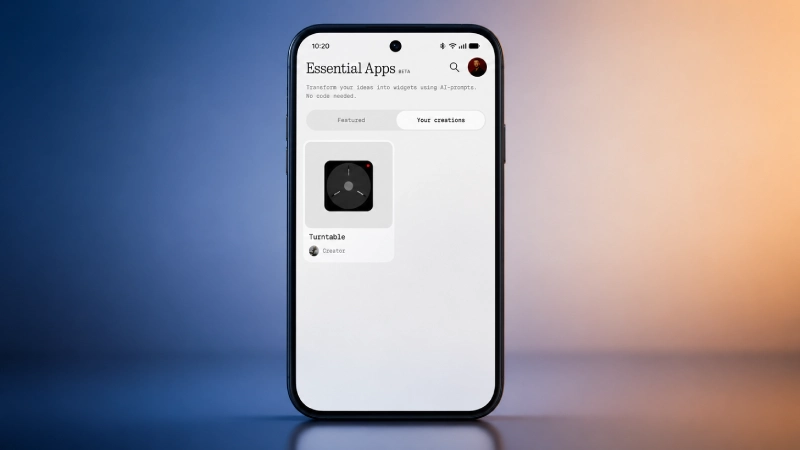
A second user, sanjaycv15, said they got an access email on a Nothing Phone (1) and managed to trigger an “Added to widget drawer” confirmation. But then they couldn’t actually find the widget anywhere on the phone. We’re putting Phone (1) as “partially functional, unconfirmed,” not a clean green check.
Confirmed Not Working: Phone (2), Phone (2a), and shockingly Phone (3)
And this is where it gets pretty surprising. Remember, when Essential Apps first showed up in beta back in February 2026, it launched as a Nothing Phone (3) exclusive, with Nothing straight up calling out the phone’s “performance headroom” as the reason. Five months later, when we tested the native app on our own Nothing Phone (3), CMF Phone 2 Pro, and CMF Phone 2a, the outcome was the same on all three: nothing happens. No builder, no widgets, just the access wall.
We’re not the only ones. Community user jamshi993 posted this error from a Nothing Phone (2) on Nothing OS 4.1:
“AiWidget is installed but too old to connect to its preview service didn’t respond. Please update AiWidget and restart.”
That same exact error also appears in a public Play Store review from user Jay Panchal, and another reviewer says the app is “not working on nothing phone 2a.” Community user RobertKanalo_ posted a screenshot that’s captioned just “Phone 2a ” and had the same situation. Meanwhile, mushipiei9, on a Nothing Phone (4a) Pro, reported they hadn’t received access at all as of this writing.
So the count right now looks like this:
| Device | Status |
| Nothing Phone (3a) | ✅ Confirmed working |
| Nothing Phone (1) | ⚠️ Access granted, widget not appearing |
| Nothing Phone (2) | ❌ AiWidget error |
| Nothing Phone (2a) | ❌ Not working |
| Nothing Phone (3) | ❌ No access yet (our testing) |
| Nothing Phone (4a) Pro | ❌ No access yet |
| CMF Phone 2 Pro | ❌ No access yet (our testing) |
| CMF Phone 1 | ❌ No access |
The Real Bottleneck
It’s not really about your hardware, more like… timing or permissions or whatever. In that same community thread, Nothing basically says, quote, “Users who don’t yet have access may see an error asking them to update AIWidget, the Essential Apps host app. This is expected.”
So yeah, that scary “update AIWidget” note people keep seeing in Play Store reviews, and those confused posts aren’t actually a sign your phone is incompatible or broken or whatever. It’s more of a generic placeholder error. Like, if your account doesn’t have access yet, the app throws that message, full stop. One person guessed that Phone (2) just needs a pending software update to “integrate with the system,” and that could sound plausible, but Nothing’s own wording feels more like the gate is tied to the account, not to the firmware.
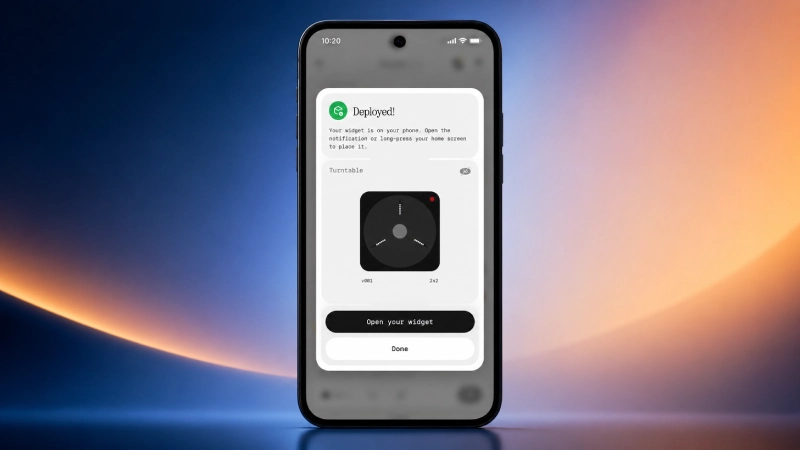
And this is why the pattern looks a little backwards. Some almost newer devices like Phone (3a) end up working, while the flagship Phone (3) (the one Essential Apps originally, you know, made for?) gets locked out. Access seems to roll out based on whether you were already part of Playground Alpha or Beta, not on device class.
As user jakob_0805 said when he was asked how he got in: “I’ve been in the Alpha and Beta programs for a while now and received access via email today.” If you’re joining later, or you’re on a non-beta phone (including CMF devices), you’re simply further back in the line. Also, the line “you’ll need a Nothing phone to use the app” doesn’t really tell you if CMF-branded phones count, or not. It’s vague.
What you can actually build (if you’re one of the lucky ones)
For anyone who actually gets access, Nothing’s Play Store description is pretty clear, and basically the whole pitch is this:
- Describe a widget idea in plain language without any code required
- The AI builder generates it, and you can preview before deploying
- Widgets can hook into native Nothing apps like weather, calendar, and settings
- You can deploy straight to your home screen from inside the app
- You can edit and manage your widget library anytime, including tweaking individual bits without rebuilding everything from scratch
Earlier, during the February web-only beta, Essential Apps supported three permissions: Location, Calendar (read-only), and Contacts. That was enough for countdown widgets, agenda-style views, and quick-dial type tools. Nothing has said camera, microphone, notifications, vibration, calling, and Bluetooth access are planned for later. But we couldn’t confirm what’s truly live in this particular native release, because none of our test phones got past that access wall.
What’s Next
Nothing says it’ll keep emailing people as access expands, and that it will eventually kill the waitlist for a general rollout. Also, the company confirmed it’s pausing new app publishing to Playground for now, the community-sharing side of the platform, so the team can focus on the on-device builder experience instead.
So if you’ve got a Nothing or a CMF phone and you hit download the second it appeared on the Play Store, don’t treat the error as proof your device is unsupported. Based on what we saw, the AiWidget message means “not your turn yet,” not “not for you.” Keep watching your inbox, and if you do get access, tell us what your home screen looks like about a week later.

Comments are closed.