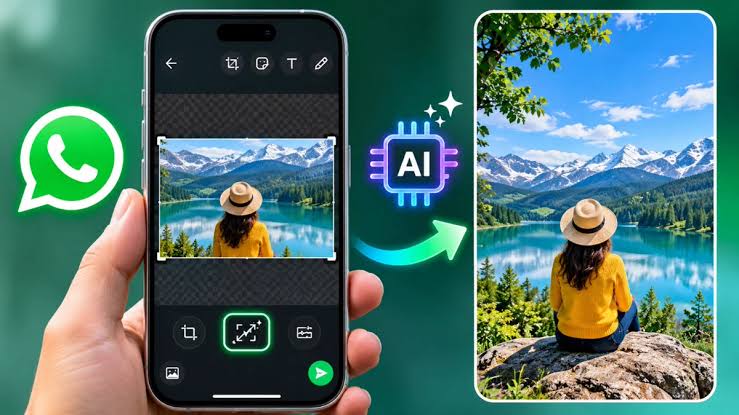
New Delhi . Popular messaging platform WhatsApp is preparing to introduce a very useful AI feature to further improve the experience of its millions of users. With the help of this new and advanced feature, users will not need any third-party photo editing app to increase the size of any of their photos. Users will be able to expand the photo within WhatsApp itself. For this, the state-of-the-art technology of Meta AI will be used, which will automatically generate new and accurate visual content at the edges of the photo.
Testing started for iPhone users, setting full screen status will be very easy
Currently, WhatsApp is testing this AI-powered 'Image Expansion' feature with iOS i.e. iPhone beta users. The biggest feature of this tool will be that with the help of Meta AI, it will convert any photo into 9:16 vertical format without damaging the original part. This will make it much easier for users to share landscape (wide) and square (square) photos on WhatsApp Status in full screen without cropping.
Know how this new AI tool of WhatsApp will work
Using this feature will be very simple and intuitive:
-
Photo selection: First of all, the user has to select his favorite photo to share in WhatsApp chat or status.
-
Entry in Drawing Editor: Once a photo is selected, it will open in the app's in-built drawing editor, where a new AI option to 'Expand Image' will appear along with other editing tools.
-
The Magic of Meta AI: As soon as the user taps on this option, Meta AI will scan the background of the photo and understand the surrounding scene. In just seconds, AI will transform the photo into a 9:16 format by adding realistic visual details to the edges of the photo.
Complete control will be in the hands of the user, facility to undo will also be available.
WhatsApp has taken special care that the user has complete control over the photo generated by AI. After Meta AI increases the size of the photo, the photo will not be sent directly or automatically to the chat. Its final preview will be shown to the first user. If the user does not like the result generated by AI, he can immediately revert to his original photo by clicking on the 'Undo' button. Apart from this, if the user wants, he can also choose the option of getting another version generated by AI.