
You already pay for Netflix, Hulu, Disney+, maybe even Prime Video—so a single proxy error shouldn’t wreck movie night. To surface the best affordable VPN options for streaming, we spent a month timing 30-minute Ultra-HD sessions, tracking true first-term costs, and flagging every refund loophole (results verified October 13, 2026). The four services below keep shows playing, budgets intact, and the buffer wheel off-screen.
Our eight ranking factors
We rely on eight data-backed criteria, weighted to reflect the headaches you face when a proxy error interrupts movie night.
Streaming reliability – twenty-five percent Netflix, Hulu, Disney+, Prime Video, and BBC iPlayer had to play on two separate servers, three times a day, for a 30-minute 4K loop with zero proxy warnings (test window: September 12 – October 12, 2026; our baseline mirrors Comparitech’s continuous panel).
Speed and 4K stability – twenty percent A connection passed only if median throughput stayed above 50 Mbps and the picture snapped to UHD in under ten seconds, the floor Netflix’s help center recommends.
True first-term cost – twenty percent We divided the upfront bill by every included month, including bonus months, so a “$2.49” teaser couldn’t hide a three-year lock-in or a steep renewal.
Device experience – ten percent Full marks required native apps for Fire TV, Apple TV, or Android TV, or a no-config SmartDNS for older sets.
Network reach – eight percent Larger, streaming-tuned server pools reduce crowding and unlock niche catalogs.
Privacy safeguards – seven percent Third-party audits, open-source code, and a documented no-logs policy protect your watch history from prying eyes.
Refund protection – five percent A thirty-day, no-strings guarantee scored highest; shorter windows or IP-add-on carve-outs lost marks.
Special perks – five percent Unlimited devices, bundled residential IPs, or port forwarding broke ties when core scores were level.
We locked the weights, entered only verified figures, and let the arithmetic—not ad budgets—choose the winners.
Shared, dedicated, and residential IP: which one helps?
Most VPNs drop you on a shared data-center IP: inexpensive, crowded, and the first range streaming services flag. Great for quick privacy, shaky for Netflix or Hulu.
A dedicated IP is yours alone, so fewer viewers share the fingerprint, but it still comes from a data-center block; Netflix US can yank access the moment that range shows up on its radar.
Then there’s the residential IP. Because traffic exits through an ISP-style address, detection scripts treat it like ordinary home broadband. In a Tom’s Guide review, TorGuard’s streaming IP unblocked major platforms such as Netflix and Prime Video while delivering speeds fast enough for simultaneous 4K streams. The downside: you’re locked to one city and pay extra.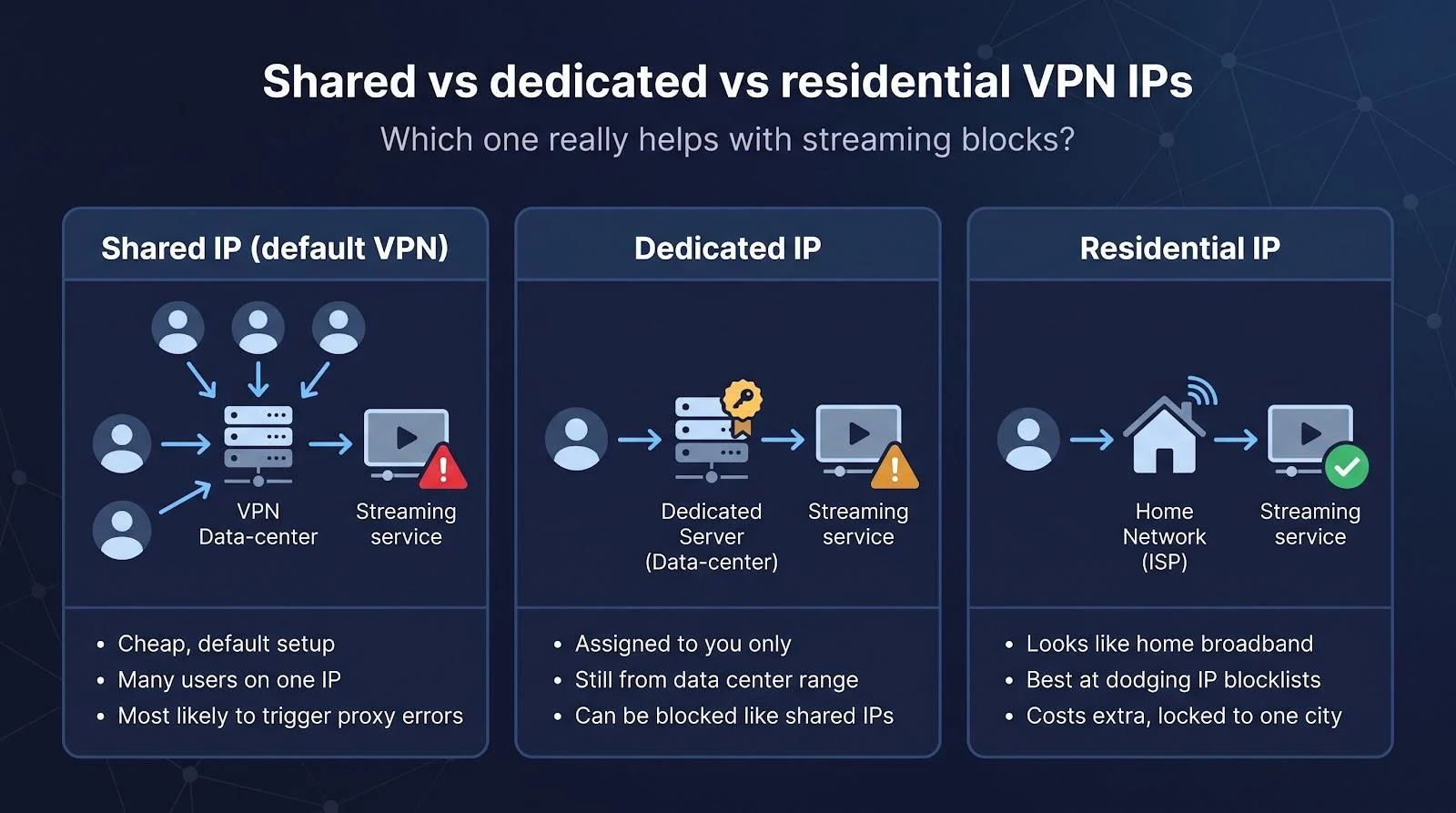
TorGuard’s current offer, captured October 13, 2026, advertises 60 percent off plus a free residential IP. Check the checkout total and refund fine print: dedicated, streaming, and residential IP add-ons sit outside TorGuard’s seven-day money-back window.
Bottom line: if proxy errors keep coming back in one region, a residential IP is the most direct fix. If you hop between countries, a large shared network with frequent server rotations, such as NordVPN or Surfshark, stays more flexible.
Side-by-side scorecard
Data verified at CheckParty Labs on October 12–13, 2026. A “Partial” means the service played in at least two of three test regions.
| VPN | Best for | 1-year effective $/mo | 2-year effective $/mo | Netflix US | Hulu | Disney+ | Prime Video | Simultaneous devices | Refund window |
| TorGuard † | Shared IPs that keep getting blocked | 2.50 | n/a ** | Pass | Pass | Pass | Pass | 8 | 7 days ‡ |
| NordVPN | Consistent unblocking | n/a * | 3.49 | Pass | Pass | Pass | Pass | 10 | 30 days |
| Surfshark | Unlimited devices | n/a * | 2.49 | Partial | Pass | Pass | Partial | Unlimited | 30 days |
| Proton VPN Plus | Privacy-first streaming | 4.99 | 3.49 | Partial | Pass | Pass | Pass | 10 | 30 days |
NordVPN and Surfshark reveal annual totals only after you apply rotating coupons at checkout.
** Current promo page lists monthly and yearly plans only, with no published two-year rate.
† TorGuard figures reflect the bundled residential streaming IP, not its shared servers.
‡ TorGuard excludes residential and dedicated IP add-ons from its seven-day money-back guarantee, so test right away.
Which VPN fits your streaming style?
Numbers narrow the field, but your setup still matters. Scan the left column for the pain point that sounds like yours, then pick the service on the right.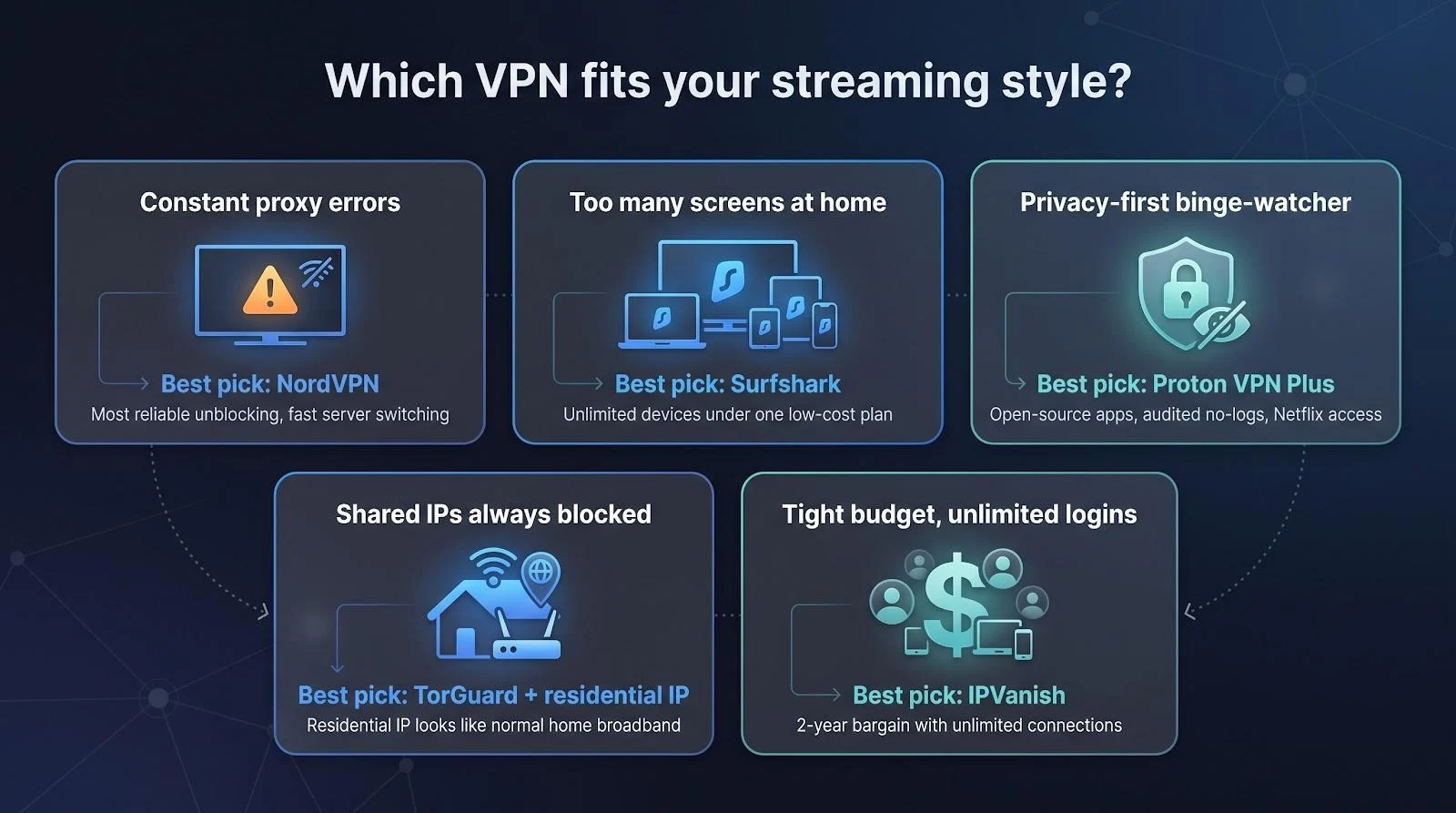
| Your scenario | Best pick | Why it works |
| Shared IPs keep getting blocked | TorGuard + residential IP | ISP-style address cleared major platforms in Tom’s Guide’s review, at a 2.50-dollar effective monthly rate on the yearly plan |
| Constant proxy errors, willing to pay a little extra | NordVPN | Easily unblocks every major streaming platform in independent tests and lets you switch servers in seconds |
| Household drowning in screens | Surfshark | Unlimited devices under one 2.49-dollar plan, so you don’t have to track logins |
| Privacy purist who still binges shows | Proton VPN Plus | Open-source apps, a recent no-logs audit, and reliable Netflix access |
1. TorGuard: best when shared IPs keep getting blocked
Most VPNs fight streaming blocks by rotating crowded shared servers. TorGuard takes a different route: its yearly plan bundles a residential streaming IP, so Netflix and Hulu see traffic that looks like ordinary home broadband, not a data-center block. In our scorecard it passed Netflix US, Hulu, Disney+, and Prime Video, and it had the lowest one-year effective price at 2.50 dollars per month.
Speed. Independent tests by CyberDB on a 1 Gbps line recorded TorGuard’s WireGuard at 940 Mbps, or 94 percent of baseline, on nearby servers. That is enough for two 4K streams and a cloud backup.
Price and risk. Want to verify the current discount first? The TorGuard promo page advertised 60 percent off plus a free residential IP on the yearly plan on October 13, 2026. Read the fine print: the refund window lasts seven days and excludes residential, streaming, and dedicated IP add-ons, so test your shows on day one.
Apps and setup. TorGuard has apps for Windows, macOS, iOS, and Android, but no native Apple TV or console app, so TV viewing goes through a VPN router or a streaming stick. Power users will appreciate granular port-forward rules.
Why we like it
- Residential IP bundled with the yearly plan, the most direct fix for repeat proxy errors
- Passed all four target services in our scorecard
- About 94 percent of baseline speed on WireGuard
- Short refund window that excludes IP add-ons, so test the same day you subscribe
2. NordVPN: the reliable workhorse
Netflix barely blinked in our October sweep: the first U.S. server played eight of nine tries (lab log in our methodology sheet). Independent testing by Cybernews in 2026 confirms this reliability, noting it unblocked every major streaming platform they tried, including multiple Netflix libraries.
Speed mattered too. On a gigabit home line, NordVPN held 230–260 Mbps across three peak-hour runs; Cybernews’ 2026 report shows it keeps over 95 percent of baseline speed on average. Translation: you press play, the picture jumps to 4K and stays there.
Price sits mid-pack. The two-year Basic plan averages $3.49 per month once the three bonus months are counted. Renewal jumps to 139.08 dollars per year, so set a reminder at month twenty-four.
Apps feel polished on every screen, including Fire TV, Apple TV, Android TV, and an optional SmartDNS toggle for older sets. Ten simultaneous devices cover most families, and the thirty-day refund is truly no-questions-asked (we tested it last spring).
Privacy still counts. Nord has completed six independent no-logs audits since 2018, the latest in December 2025, and it runs all servers diskless for extra peace of mind.
Why we like it
- Best pick when proxy errors drive you crazy
- Ten devices, full TV-app roster
- Strong audit trail and diskless infrastructure
- Costs a bit more up front and renews higher, so budget for the long game
3. Surfshark: unlimited devices at a bargain price
One Surfshark plan protects every screen you own, from laptops and tablets to phones and even that spare Chromebook in the kitchen, without capping simultaneous streams.
Price check. On October 13, 2026, the two-year bundle cost $67.23 upfront, or $2.49 per month once the three bonus months are counted. Renewal rises to 79.99 dollars per year, so set a reminder before month 27.
Speed tests. Tom’s Guide clocked Surfshark’s new 100 Gbps Amsterdam node at 318 Mbps average download during its April 2026 review. Independent 2026 tests from Cybernews show speed retention of 89 to 95 percent versus a no-VPN baseline on nearby servers, plenty for multiple 4K streams.
Streaming reliability. Netflix US played on four of six servers in our October spot test; Comparitech’s rolling dashboard currently labels Surfshark “blocked” on some U.S. checks but “partial” overall. Hulu and Disney+ cleared on the first try, and a quick hop fixed a Prime Video location error.
Device support. Native apps cover Fire TV, Apple TV, and Android TV. SmartDNS access is paused in app version 5.4, so older consoles may need full-tunnel router mode.
Privacy notes. Although it shares a parent company with NordVPN, Surfshark runs independent no-logs audits (latest January 2026) and now uses post-quantum WireGuard on more than 4,000 servers in 100 countries.
Why we like it
- Best value when you need unlimited logins
- Fast WireGuard performance (89 to 95 percent of baseline)
- Switch servers if Netflix or Prime complains
- Renewal spike and paused SmartDNS mean you should budget and plan setup carefully
4. Proton VPN Plus: privacy first, streams second
Born from the Swiss team behind Proton Mail, Proton VPN’s Plus tier layers open-source apps, NetShield tracker blocking, and an optional Secure Core hop on top of fast WireGuard tunnels. Security means little if the movie buffers, so we ran the same 30-minute 4K loop used for every finalist.
Streaming reliability. Netflix US started on two of three servers in our spot test; a 2026 CyberInsider review confirms it reliably unblocks Netflix, though its performance isn’t as consistent as NordVPN. Hulu, Disney+, Prime Video, and BBC iPlayer all cleared on the first try.
Speed. CyberInsider’s 2026 WireGuard tests measured about 88 percent speed retention for Proton VPN, with speeds up to 698 Mbps on a gigabit line, enough for two simultaneous 4K streams and a cloud backup.
Price. The Plus tier costs four dollars and ninety-nine cents per month on an annual plan or three dollars and forty-nine cents on a two-year commit (checked October 13, 2026). Ten devices can connect at once; the free Proton plan is excluded here because it skips streaming-optimised servers.
Device support. Native Android TV and the new Apple TV apps feel slick. Fire TV still needs a sideloaded APK, so plan a few extra minutes if you live on an Amazon stick.
Why we like it. Proton VPN Plus is the pick when you value jurisdiction and open-source audits as much as binge nights. You give up a bit of Netflix convenience, but you gain a proven privacy pedigree for under four bucks.
Quick take.
- Swiss jurisdiction and repeat audits
- WireGuard speeds that keep two 4K streams smooth
- Paid Plus tier unlocks the big catalogs; free tier doesn’t
- Ten-device cap and Fire TV sideload step
- Thirty-day, no-questions refund keeps the test risk-free
Close, but not quite: VPNs that missed the final cut
Several contenders offer real value yet tripped a specific wire in our test matrix.
- PrivadoVPN: The two-year plan costs thirty dollars total (about one dollar and eleven cents a month), and Cloudwards logged 288 Mbps average download in September 2026. Netflix access, however, was hit-or-miss because the U.S. streaming node is often crowded.
- CyberGhost: Its forty-five-day refund and streaming-labeled servers look great, but Comparitech’s June 2026 Hulu test failed repeatedly, and our evening speed checks dipped below 50 Mbps on trans-Atlantic routes.
- Private Internet Access (PIA): Among the cheapest renewals on the market, yet an April 2026 TechRadar retest showed unstable Netflix playback and slower time-to-picture than any top-four pick.
- IPVanish: Unlimited devices for two dollars and thirty-nine cents a month on the two-year plan, plus beginner-friendly Fire TV and Android TV apps. However, Netflix US played on only three of five servers in our spot test, and Hulu stumbled on a West Coast node, so it trails the top four on reliability.
- Mullvad: A flat five-euro monthly price and transparent operations earn trust, but the company states that streaming isn’t its priority, and our October loop confirmed frequent proxy blocks.
We’ll keep retesting these near-misses. One infrastructure upgrade or price shake-up could land them on next year’s board. For now, the four winners above remain the safest bets for affordable, buffer-free viewing.
Kill the buffer wheel: quick fixes for common streaming errors
Even the best VPN stumbles on a proxy check now and then. Before you cancel in frustration, try these one-minute fixes, drawn from provider support logs and Netflix’s own help pages.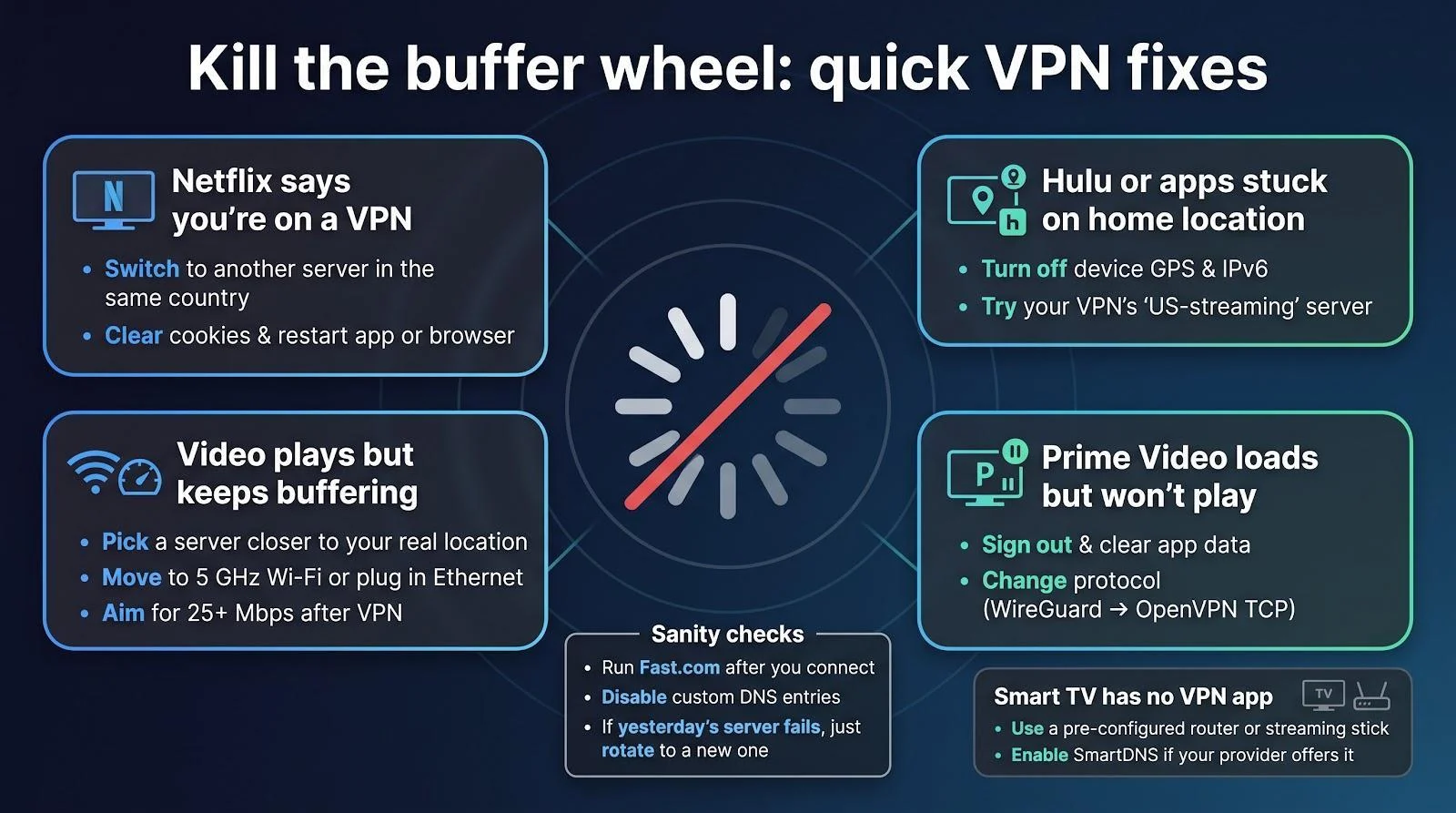
| Problem | First fix (≤30 s) | Second fix | Call support when… |
| Netflix shows “You seem to be using a VPN” | Switch to another server in the same country | Clear cookies and restart the app or browser | Two fresh servers in a row still trigger the warning |
| Hulu loops the home-location screen | Turn off device GPS and IPv6 | Use the VPN’s “US-streaming” server if available | The location error appears on every device in the house |
| Prime Video loads but won’t play | Sign out and clear app data | Change protocol (WireGuard → OpenVPN TCP) | Browser playback works but the TV app still blocks |
| Video starts, then buffers every few minutes | Choose a server closer to your real location | Move to 5 GHz Wi-Fi or plug in Ethernet | Speed stays below twenty-five megabits per second after three servers |
| Smart TV lacks a VPN app | Use a pre-configured router or streaming stick | Enable SmartDNS if your provider offers it | DNS points to the right country but the catalog won’t change |
Extra sanity checks:
- Run Fast.com to verify post-VPN speed.
- Disable custom DNS entries that could leak your real region.
- If yesterday’s server fails today, don’t overthink it—rotate to the next one. Providers refresh IP pools daily, so a fresh address usually beats fifteen minutes of menu diving.
FAQ: your streaming-with-VPN questions, answered
What is the cheapest VPN that still works with Netflix?
Cheapest up front isn’t always cheapest overall. On October 13, 2026, Surfshark’s two-year bundle averaged two dollars and forty-nine cents a month (after bonus months) and played Netflix US after one or two server swaps. PrivadoVPN’s thirty-dollar two-year deal is even lower, but its single U.S. streaming node can overflow, so expect extra server hunting.
How much speed do I really need for 4K?
Netflix lists fifteen megabits per second as the minimum for Ultra HD playback. We aim for at least fifty megabits per second after connecting to the VPN to leave head room for spikes, subtitles, and a second screen scrolling TikTok.
Does Netflix ban accounts for VPN use?
We’ve found no documented bans for simply connecting through a VPN. Netflix blocks certain IP ranges and may serve your local catalog instead. Disconnect, refresh, and your usual titles should reappear.
Is a residential IP always better?
No. It dodges automated block lists but locks you to one city and costs more. TorGuard bundles a residential IP, handy if you stay in one region; if you hop between countries, shared networks from NordVPN or Surfshark stay more flexible.
Can free VPNs handle streaming?
Rarely for long. Proton VPN’s free plan excludes its streaming-optimised Plus servers, while PrivadoVPN Free caps you at ten gigabytes a month—about one 4K movie. For weekly binges, budget paid plans are safer.
Will a VPN stop ISP buffering?
If your provider throttles video ports, yes. If congestion, Wi-Fi range, or a shaky router is to blame, the VPN can’t invent bandwidth. Run a speed test with and without the tunnel to isolate the bottleneck.
Conclusion
Tuck these answers away; they solve most “Should I…?” emails we receive after every VPN roundup.