
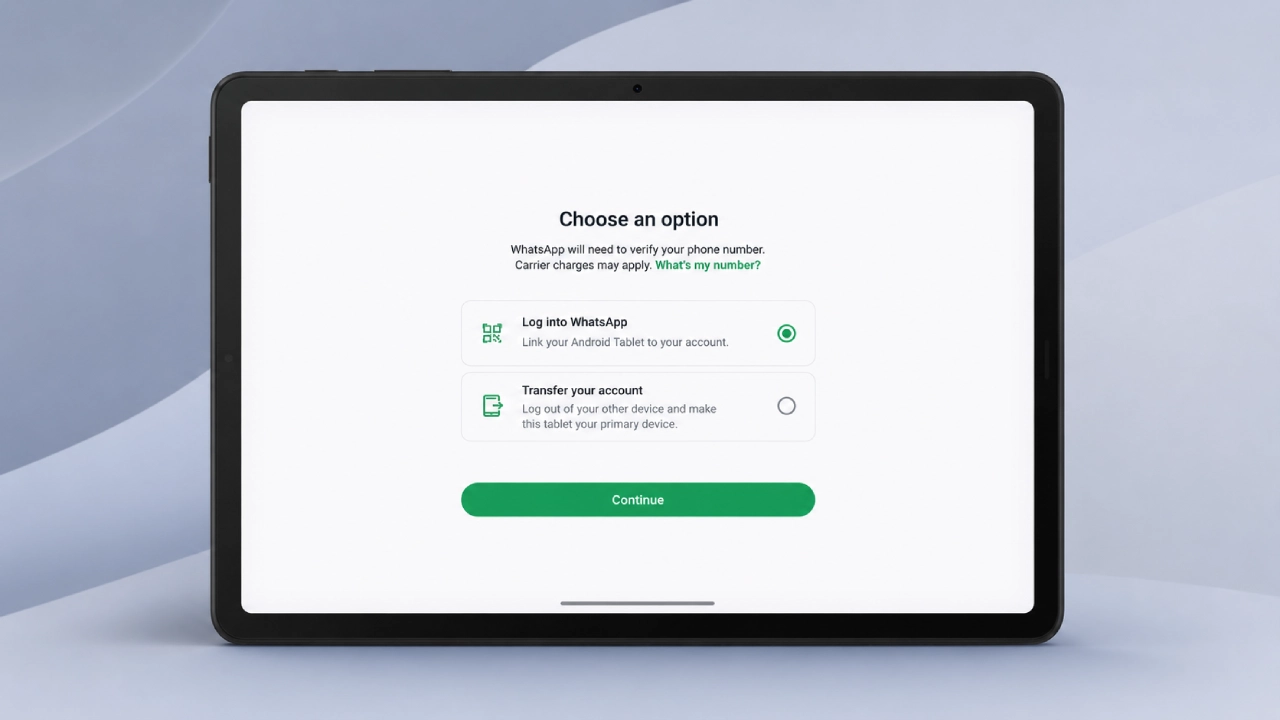

The WhatsApp Tablet Update is testing a new setup screen for Android tablets, giving users a clearer choice when signing in.
According to WABetaInfo, the new screen is called “Choose an option” and is available to some beta testers on the latest WhatsApp beta for Android. The feature is still in testing and has not yet rolled out to the stable version.
With this WhatsApp Tablet Update, users can either link their Android tablet as a companion device to an existing WhatsApp account or transfer their account and set the tablet as the primary device. This makes tablet setup more flexible and easier to understand
WhatsApp Android Tablet Update at a Glance
| Detail | Information |
| App | |
| Platform | Android tablets |
| Feature | New setup screen |
| Screen Name | Choose an option |
| Status | Rolling out to some beta testers |
| Setup Options | Link as companion device or transfer account |
| Primary Device Support | Yes |
| Stable Release | Not announced |
| Source | WABetaInfo |
What Is Changing for Android Tablets?
The WhatsApp Tablet Update makes account setup clearer for Android tablet users.
Until now, most Android tablet users relied on companion mode, which lets them link a tablet to an existing WhatsApp account on a phone by scanning a QR code. This allows the tablet to use the same account without keeping the phone nearby all the time.
However, companion mode still has some limits. Users cannot share live location or send messages to broadcast lists from a linked tablet. Also, if the primary phone remains inactive on WhatsApp for 14 consecutive days, WhatsApp logs out the linked tablet for security reasons.
The new WhatsApp Tablet Update does not remove companion mode. Instead, it gives users a clearer setup choice from the beginning.
Companion Mode vs Primary Tablet Mode
| Feature | Companion Mode | Primary Tablet Mode |
| Setup Method | Link to phone with QR code | Transfer account to tablet |
| Needs Existing Primary Phone | Yes | No after transfer |
| 14-Day Phone Activity Rule | Applies | Does not apply |
| Live Location Sharing | Not available | Available |
| Broadcast Lists | Not available | Available |
| Previous Phone Status | Remains primary | Logged out as primary |
| Best For | Using tablet as secondary device | Using tablet as main WhatsApp device |
How the New Setup Screen Works
The new setup screen gives users two options when they open WhatsApp on an Android tablet for the first time.
The first option lets users log into WhatsApp by linking the tablet as a companion device. This works like the existing QR-code setup.
The second option lets users transfer their account to the Android tablet. If selected, WhatsApp asks for the user’s country code and phone number, then sends a six-digit verification code. After verification, the tablet becomes the primary device.
How to Make an Android Tablet the Primary WhatsApp Device
| Step | Action |
| Step 1 | Open WhatsApp beta on the Android tablet |
| Step 2 | Choose the “Transfer your account” option |
| Step 3 | Enter country code and phone number |
| Step 4 | Verify the account with the six-digit code |
| Step 5 | Restore chat history from Google Drive, if available |
| Step 6 | Use the Android tablet as the primary WhatsApp device |
What Happens to the Old Phone?
When the Android tablet becomes the primary device, the previous primary phone is automatically logged out.
WhatsApp supports only one primary device at a time. If users later want to use the old phone again, they can link it as a companion device by scanning a QR code from the tablet. Users can also transfer the account back to the phone later if they change their mind.
Previous Phone After Transfer
| Scenario | Result |
| Tablet becomes primary | Old phone is logged out |
| User wants phone access again | Phone can be linked as a companion |
| User changes mind | Account can be transferred back to phone |
| Multiple primary devices | Not supported |
Why This Removes the 14-Day Tablet Problem
The 14-day rule applies to linked companion devices.
If a phone remains inactive on WhatsApp for 14 consecutive days, WhatsApp logs out linked companion devices, including tablets. This can be a problem if the user’s phone is lost, broken, or unavailable for a long period.
By making the Android tablet the primary device, users avoid this specific companion-mode limitation. The tablet no longer depends on the phone’s activity status because the tablet itself becomes the main WhatsApp device.
Why It Matters
| Problem | New Tablet Primary Mode Helps Because |
| Broken or lost phone | Tablet can continue as the main WhatsApp device |
| Long phone inactivity | 14-day companion logout does not apply |
| Tablet-only workflow | Users can use WhatsApp without relying on a phone |
| Live location sharing | Available on primary device |
| Broadcast lists | Available on primary device |
| Easier setup | Choice appears directly during tablet setup |
Companion Mode Is Still Available
Users who prefer the existing linked-device setup can continue using companion mode.
The new screen simply gives users a clearer choice. People who want WhatsApp on both phone and tablet can still link the Android tablet as a companion device. People who want the tablet to become the main WhatsApp device can choose the transfer option instead.
This is useful because different users have different needs. Some want the tablet as a secondary screen, while others may want the tablet to fully replace the phone for WhatsApp.
Android Tablet Feature Is Still in Beta
The new setup interface is currently available only to some WhatsApp beta testers on Android.
WABetaInfo says the feature is rolling out to more users over the coming weeks, but it is still under testing. WhatsApp has not announced when the dedicated setup screen will reach the stable version.
That means regular users may not see the feature immediately, even if they install WhatsApp on an Android tablet.
Availability
| Detail | Status |
| Android Beta | Available to some beta testers |
| Wider Beta Rollout | Rolling out over coming weeks |
| Stable Version | Not announced |
| All Android Tablets | Not guaranteed yet |
| iPad Similar Feature | Already rolled out through WhatsApp Messenger 26.25.74 |
WhatsApp for iPad Already Supports Similar Setup
WABetaInfo also notes that WhatsApp for iPad already supports a similar setup option.
On iPad, users can choose whether to link the device as a companion or register it as the primary device. The Android tablet version now works in a similar way, but with different wording and a refreshed setup screen.
This brings Android tablet setup closer to the experience already available for iPad users.
Why It Matters
The update matters because it makes WhatsApp more practical for tablet-first users.
For years, tablets were treated mainly as secondary devices. That worked for people who simply wanted a bigger screen, but it created problems for users whose phone was unavailable. The new primary-device option gives Android tablet users more control and makes WhatsApp less dependent on a phone.
It also makes WhatsApp more useful for people who use tablets for work, travel, accessibility, education, or as their main communication device.
The Bigger Picture
WhatsApp has been slowly improving multi-device support across phones, tablets, desktops and browsers.
This Android tablet setup screen is not a complete multi-primary-device system. Users still cannot have two primary devices at the same time. But it is an important step because it gives Android tablet users a direct setup path instead of forcing everyone into companion mode by default.
Bottom Line
WhatsApp is testing a new Android tablet setup screen that lets users choose between companion mode and primary-device setup.
If users transfer their account to the tablet, the Android tablet becomes the primary WhatsApp device. This removes companion-mode restrictions such as the 14-day phone inactivity logout, and also enables features like live location sharing and broadcast lists.
The feature is currently available to some beta testers and has not yet been announced for the stable version.

Comments are closed.