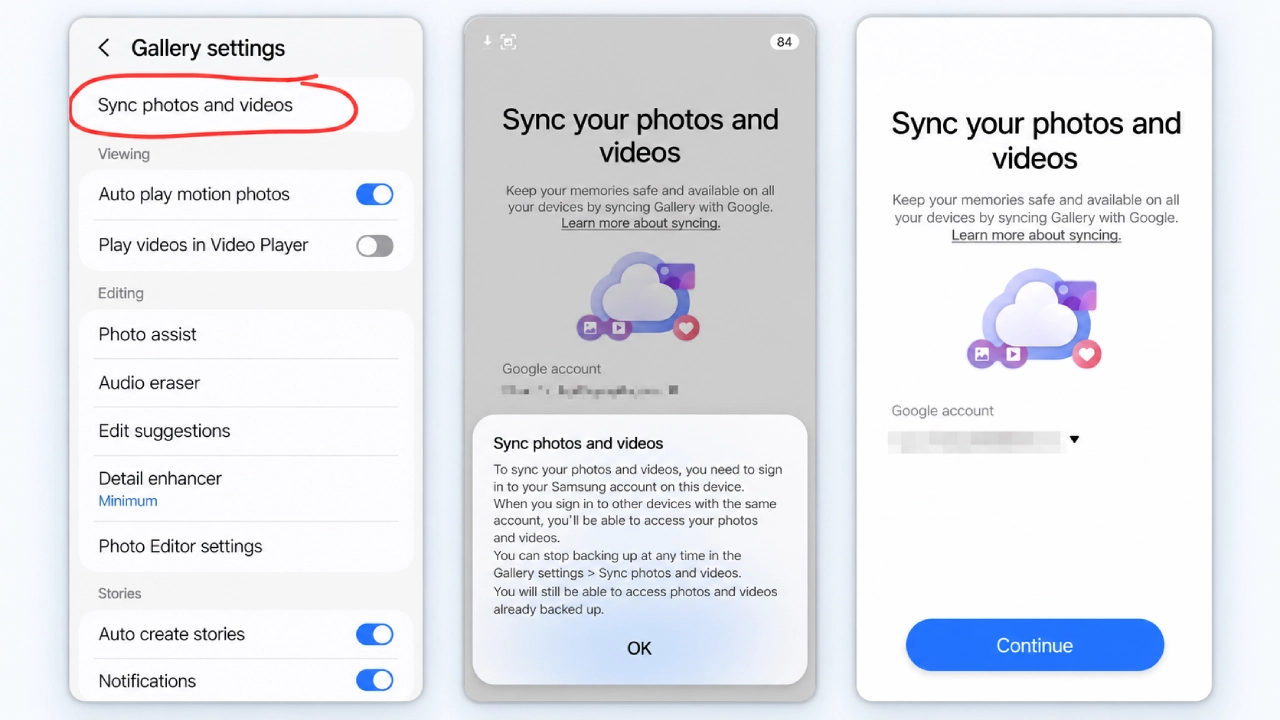
Samsung is beginning to roll out Google Photos sync in its Gallery app. The new “Sync photos and videos” option is currently being shown to users of Samsung Gallery version 15.9.01.7 and enables the connection of a personal Google account and the synchronization of the gallery content.
The rollout comes just days before Samsung’s existing Gallery integration with Microsoft OneDrive is scheduled to end on September 30, 2026. Samsung stated that this service will be discontinued at that date, although existing photos and videos in OneDrive will stay there. Samsung is introducing a new Google-based cloud-sync option as its Gallery-OneDrive integration approaches its end date.
Samsung Gallery Starts Getting Google Cloud Sync
The rollout has been observed with Samsung Gallery 15.9.01.7 and the accompanying Gallery Cloud Sync component, although availability remains account-, device- and region-dependent. Users can access the option by tapping on the following path: Gallery > Menu > Settings > Sync photos and videos. The option is rolling out gradually, which means that updating Samsung Gallery to the latest version does not automatically guarantee the availability of this option on Galaxy devices.
Once enabled, users can connect a Google Account and sync photos and videos from Samsung Gallery. Google’s own support documentation now officially describes the feature as Samsung Gallery Cloud Sync with a Google Account, independently confirming that this is more than an unverified social-media discovery.
Google Officially Documents Samsung Gallery Cloud Sync
Google says Samsung Gallery Cloud Sync is available only on supported Samsung devices running Android 13 or later. Users also need a personal Google Account to use the feature.
Google Workspace accounts are not supported, and the feature is also unavailable for supervised Google Accounts. Availability can also vary depending on the Samsung device, Google Account, and region, so the presence of Gallery version 15.9.01.7 does not necessarily mean the feature will be available immediately on every compatible Galaxy device.
Samsung Gallery Won’t Show Your Entire Google Photos Library
There is an important limitation Galaxy users should understand.
Samsung Gallery does not simply become a complete front end for every photo already stored in a user’s Google Photos library. Google’s documentation says Samsung has access to media originally backed up through Gallery Cloud Sync, rather than unrelated items that were already in Google Photos from other sources.
Google also notes that Samsung-synced media does not automatically receive access to every Google Photos feature, including Memories and highlights, Live albums, and Search, unless the items are also backed up through Google Photos.
Google Storage Will Be Used for Synced Media
The new integration also uses the storage associated with the user’s Google Account. Photos and videos synced through Samsung Gallery are backed up to Google Photos in original quality and count toward the account’s available storage. Users can choose which Gallery folders or albums they want to sync, including folders such as Camera, Screenshots or Downloads. They can even turn off main-camera-roll sync while keeping other folders enabled. This gives Galaxy users some control over which content is sent to Google’s cloud storage.
Deleting Synced Photos Can Affect Both Services
Another crucial fact that users must know about the feature is that Samsung Gallery Cloud Sync maintains synchronization between the media stored in Samsung Gallery and Google Photos.
For synced media, deletions generally stay synchronized between Samsung Gallery and Google Photos. Google notes exceptions where multiple or edited copies exist.
This makes the feature different from a simple one-way backup system: changes to synced content can be reflected across the connected services.
What Happens to Your OneDrive Photos After September 30?
Samsung’s OneDrive integration is not already gone. The company officially lists September 30, 2026, as the end date for Gallery’s OneDrive sync. Photos and videos already stored in OneDrive through Gallery synchronization will remain in the user’s OneDrive account.
After September 30, OneDrive-synced media will no longer appear inside Samsung Gallery unless it has been downloaded locally. The files remain accessible through OneDrive.
Users should not expect their OneDrive collection to be automatically transferred to Google Photos. The Google integration is a separate cloud-sync service rather than a migration tool. Users who want cloud-only OneDrive files available locally or in Samsung Gallery afterward should download the originals before September 30.
What the Google Switch Means for Galaxy Users
Samsung Gallery itself is not being replaced. The change concerns the cloud service connected to the native Gallery experience.
The transition can broadly be understood as:
Until September 30, 2026: Samsung Gallery → Microsoft OneDrive
New rollout: Samsung Gallery → Google Account / Google Photos
Samsung Gallery is gaining a Google-based cloud-sync option as its OneDrive integration ends. However, the Google integration should not be viewed as a direct replacement that automatically transfers existing OneDrive content.
Google Becomes Samsung Gallery’s New Cloud-Sync Option
The rollout gives Galaxy users a clearer picture of what follows Samsung’s decision to end Gallery’s OneDrive integration.
TechGenyz previously covered the upcoming OneDrive shutdown in “Samsung Gallery Ending OneDrive Sync: What Big Happens Next?”, which explained the September 30 deadline and what would happen to existing OneDrive content.
Google’s official documentation and the beginning of the Samsung Gallery rollout now provide the next part of that story. Google-based Gallery Cloud Sync is becoming available to eligible users, but it should be treated as a new synchronization option rather than a seamless OneDrive-to-Google migration. Samsung Gallery is gaining a Google-based cloud-sync option as its OneDrive integration ends.
(Source)