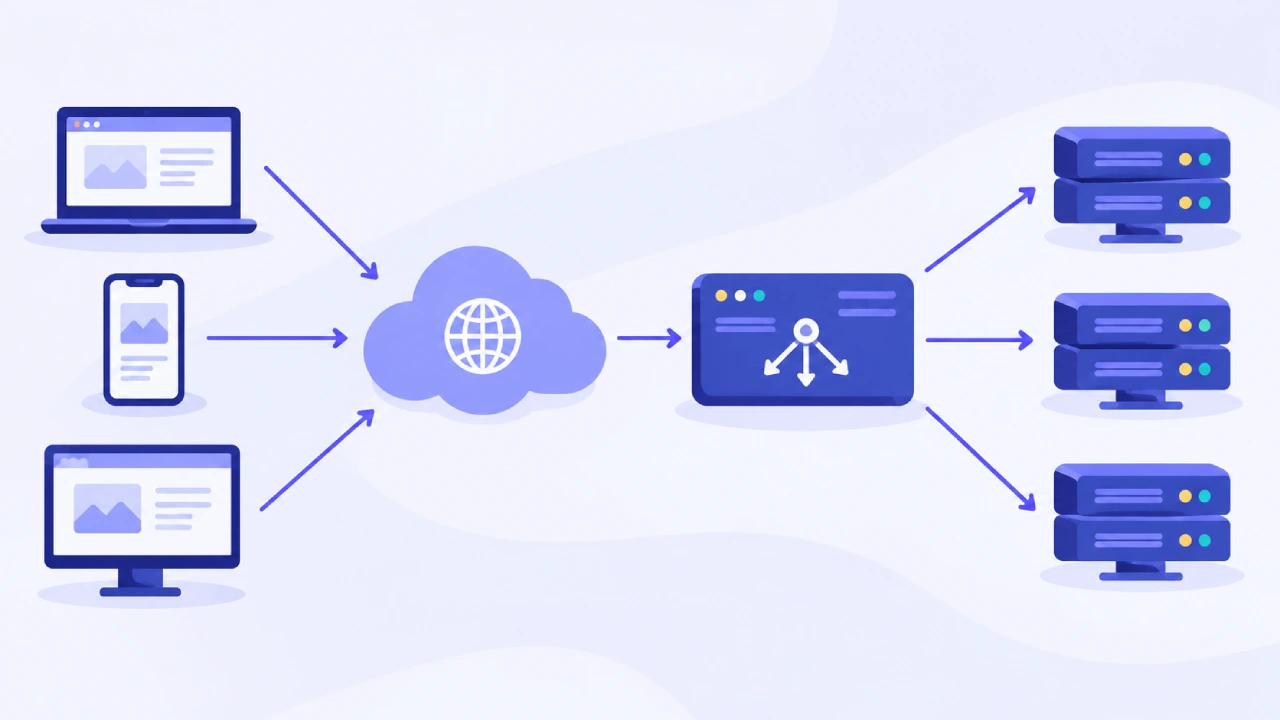
In modern times, any digital application should be able to cope with traffic under normal workday conditions, when launching a new product, or when an unexpected surge of visitors happens. The scaling of applications makes it increasingly difficult to process all the traffic using a single server. Using cloud load balancing is one way of solving this problem since this tool will be able to distribute traffic evenly between multiple backends.
What Is Cloud Load Balancing?
Load balancing in the cloud environment involves the process whereby the cloud-based load balancer divides the incoming network traffic among several backend servers, virtual machines, containers, or any other type of application resources. According to Microsoft, Azure Load Balancer refers to a service that helps to distribute incoming traffic among a set of backend resources for better scalability and availability of applications.
The basic architecture is straightforward. A client connects to a frontend address, while the load balancer decides which backend resource should receive the traffic. Instead of relying on one server to handle every request, multiple instances can share the workload.
However, the process of distributing traffic varies depending on the load balancing service being used. For instance, AWS Elastic Load Balancing helps to distribute traffic among the load balancer nodes as well as the registered targets. In contrast, Azure Load Balancer can use the connection flow information to make its decision rather than having all individual requests processed in a round-robin order.
Why Traffic Distribution Matters
Traffic distribution becomes increasingly important as a digital product scales. If one backend instance receives substantially more traffic than others, adding more servers may not solve the underlying problem.
According to Microsoft, the following factors could be responsible for uneven traffic distribution: IP properties of the source, proxies, NAT, session persistence, and the load balancing algorithm itself. Thus, it’s necessary to monitor traffic distribution in practice rather than make assumptions about it.
Key Benefits of Cloud Load Balancing
1. Better Scalability
Load balancing allows an application to operate across multiple backend instances. As demand increases, additional resources can be added to the backend pool, allowing the product to handle a larger volume of traffic.
This concept is especially beneficial for applications whose demand keeps changing. Rather than relying on a single big machine to host the application, the workload can be spread among various machines. This may also involve different ways of scaling depending on the design of the application. However, the load balancer only distributes traffic. It does not automatically make an application’s database, storage layer, APIs, or other dependencies scalable. Those components must also be designed to handle increased demand.
2. Improved Availability
One of the biggest advantages of load balancing is that traffic does not have to remain tied to an unhealthy backend instance. Health probes can check whether backend resources are available. Azure Load Balancer, for example, supports TCP, HTTP, and HTTPS health probes. When an instance is determined to be unhealthy, the load balancer stops sending new connections to that instance.
AWS Network Load Balancer similarly uses active health checks to determine whether registered targets are available to handle requests. This creates an important layer of fault tolerance: a failed application instance can be removed from normal traffic distribution while healthy instances continue serving users.
3. Support for High Availability
High availability depends on more than having several servers in one location. Backend resources should be distributed in a way that reduces the impact of infrastructure failures. For example, according to Microsoft Azure best practices, it is recommended to use several backend endpoints to create redundancy. Zone redundancy will allow you to keep your application running even if there is a failure of one availability zone.
For products operating across regions, global or cross-region load-balancing capabilities can also distribute traffic between locations. This can provide another layer of resilience, although it introduces additional architectural and operational complexity.
How Health Checks Keep Traffic Away From Failures
Health checks are central to a reliable load-balancing design. A health probe periodically checks an endpoint to determine whether a backend instance should receive new traffic.
The check needs to represent meaningful application health. Microsoft recommends probing an endpoint that reflects the health of the instance and application service rather than blindly checking whether a machine is running.
Why Health-Check Configuration Matters
A health check can fail for several reasons, including an incorrect port, an inaccessible endpoint, firewall rules, or an application timeout. Microsoft specifically notes that blocked probe traffic or a mismatch between the configured probe and the application can cause backend instances to be marked unhealthy.
In addition, there is always a tradeoff between the quickness of the detection of the health check and its stability. Aggressive settings of the health checks will help to quickly detect failures; however, at the same time, it will lead to quick removal of the instance because of transient issues.
Risks and Limitations of Cloud Load Balancing
Uneven Traffic Distribution
The load balancer does not always balance out the load evenly across all the servers. Based on the algorithm used and the nature of the connection, some servers may have to deal with far more traffic than other servers. This means monitoring remains important. Teams should look beyond whether the load balancer is technically functioning and examine backend utilization, connection counts, latency, and application-level performance.
Incorrect Health Checks
A health check may turn into a cause of failure due to the inaccurate representation of the application health state. The server could return positive results for a simple network health check while having an application dependency down.
Conversely, an incorrectly configured probe may mark a healthy instance as unavailable. This can reduce the available backend capacity and potentially send excessive traffic to the remaining instances.
The Load Balancer Can Become Part of the Failure Path
Although cloud load balancers are designed for availability, they are still an important part of the application’s network architecture. A configuration problem, unsuitable routing rule, or incorrect health model can affect the entire traffic path. For this reason, high availability should be designed across the application stack rather than treated as a feature provided by the load balancer alone.
Building a More Reliable Load-Balancing Strategy
Practical design starts with the understanding of traffic and failover expectations of the application. The team needs to understand which components require scaling, what state of the backend means its health, and how traffic should react to resource unavailability.

Monitoring is equally critical. Azure offers metrics about health probes and data paths that allow teams to find issues in backends or infrastructure.
Finally, organizations should test failure scenarios rather than assuming that failover will work as expected. Microsoft recommends regularly testing instance, zone, and regional failover scenarios to validate that unhealthy resources are removed from traffic and that monitoring and routing behave as intended.
The Bottom Line
Cloud load balancing is an important building block for scalable digital products because it can distribute traffic, identify unhealthy backend resources, and support high-availability architectures. Its benefits, however, depend heavily on implementation. Load balancing alone is incapable of resolving the issue if an application has a problem with only one database, bad dependencies, and wrong health check configurations. Thus, the best strategy would be to consider it just one of several components of resilience architecture.
Thus, the task of creating a scalable product is not just about balancing traffic. It is much more about building something that will work efficiently, detect any failure, and continue working even when some particular resource fails.
(Source)